
May 21, 2014
Answered

Multilevel lists in indented text

  • May 21, 2014
  • 1 reply
  • 1228 views

Hello everybody,

I am using RoboHelp HTML 11 and I have a question regarding the use of multilevel lists in indented text.

The main text in my topics is indented by 122.7px in order to leave enough space for text boxes that summarize the main text parts in the left margin.

Now I want to create a multilevel list style so that I can use these lists in the indented main text. Therefore, I created a paragraph style "List_Style" which includes the indention of the main text (122.7px). Then I created a new multilevel list style in which each list level is based on the "List_Style" paragraph style. In my understanding the indention should be adopted from the "List_Style" style but unfortunately it doesn't. Can anybody please tell me why and what I have to do to make this work?

Best,

Mr. Fox

PS: My output will be HTML5 Responsive Layout and Printed Documentation and I created all styles I am using in RoboHelp.

This topic has been closed for replies.
Correct answer Peter Grainge

Thank you very much for your explanation Peter. I figured out how to do it and my lists work now and look good in the browsers.

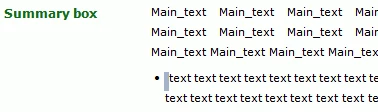
The only thing I am still stuck with is the list layout in the printed document. The lists levels have the right position but for some reason there is an extra space between the list element and the first word of the first line (in all levels).

It is highlighted in grey in my Word.doc screenshot:

I played around with the indents and list element type/sizes the whole day but nothing seems to work. Depending on the indent I chose, the extra space becomes larger, but never smaller. The first word of the first line just does not align with the second line.

On your website I read that sometimes lists do not indent properly and that style mapping is required.

Is this that kind of issue or is there an easy fix in RoboHelp? What causes this issue?

Best,

Mr. Fox


There isn't a setting in Rh or Word that will fix it. Word lists are a law unto themselves.

You can map a Rh multilevel list to a Word list style. Maybe if you set up a Word list and mapped to that you would get a better result. You have to create a multilevel list in a Word template and map to that.


See www.grainge.org for RoboHelp and Authoring tips

@petergrainge

1 reply

Participating Frequently
May 23, 2014


Mr. Fox,

I would suggest you check out Peter Grainge's site regarding Multi-Level list.  (click link below)

May 26, 2014

Thank you very much for your reply amerilinguistics.

Peter's site is excellent, I've studied it before but unfortunately I could not figure out what my problem is.

I will try to describe it as detailed as possible:

The paragraph style of my main text "MyMainText" has the following properties:

p.MyMainText {

    font-size: 9pt;

    margin-bottom: 6pt;

    line-height: 150%;

    text-align: justify;

    font-family: Verdana, sans-serif;

    margin-top: 0pt;

    text-indent: 0px;

    margin-left: 122.7pt;

I have copied the "MyMainText" paragraph style and named it "List_style". Consequently it has the same properties as "MyMainText" (I just wanted to be able to play around, that is why I created "List_style"). My multilevel lists should be based on "List_Style" so that they align properly with the main text and the margin of 122.7pt is kept.

Then I created a new multilevel list "MyBulletList":

rh-list.MyBulletList {

    x-level-count: 3;

    x-lvl-1-type: MyList_Level1;

    x-lvl-1-format: "<x>";

    x-lvl-1-margin: 20px;

    x-lvl-1-text-indent: -20px;

    x-lvl-1-p-class: List_Style;

    x-lvl-1-p-tag: p;

    x-lvl-2-type: MyList_Level2and3;

    x-lvl-2-format: "<x>";

    x-lvl-2-margin: 40px;

    x-lvl-2-text-indent: -20px;

    x-lvl-2-p-class: List_Style;

    x-lvl-2-p-tag: p;

    x-lvl-3-type: MyList_Level2and3;

    x-lvl-3-format: "<x>";

    x-lvl-3-margin: 60px;

    x-lvl-3-text-indent: -20px;

    x-lvl-3-p-class: List_Style;

    x-lvl-3-p-tag: p;

}

I now go back to my main text and hit ENTER to insert a multilevel list. Therefore, I click the Insert Multilevel list button and select my "MyBulletList".

Result: The bullet appears in the margin that should be kept blank even though it is actually part of my "List_Style".

My questions are:

  • Why are the list levels not based on the paragraph style "List_Style" and its set margin of 122.7pt?
  • What can I do to make the lists work (HTML5 Responsive Layout and Printed Documentation)?

Any advice would be greatly appreciated.

Mr. Fox

Peter Grainge
Community Expert
Community Expert
May 27, 2014

What you want, if I have followed correctly, is the body text indented by 122.7px and the multi-level list to be indented by the same amount. Correct?

If so, it seems to me that the solution is

  • Normal (the <p> tag) is set to 0px, or wherever you want the left side of the text box.
  • A paragraph style called say Indent is set to 122.7px so that your body text has that applied and aligns to the right of the text box.
  • A multilevel list style has its first level set to 122.7px.

You don't superimpose a paragraph style over a multilevel list style in the way you can when you click the single level list icon. You choose either the paragraph style or the multilevel list style and both should have the 122.7px indent.

Does that help?


See www.grainge.org for RoboHelp and Authoring tips

@petergrainge

Use the menu (bottom right) to mark the Best Answer or Highlight particularly useful replies. Found the answer elsewhere? Share it here.