
Participant
February 19, 2014
Answered

Multilingual output; multilingual TOCs; one project

  • February 19, 2014
  • 3 replies
  • 1368 views

Cannot find any info online or here at Adobe. Here's what I'm interested in finding out:

What is the best way to manage multilingual help projects? I saw a topic on creating multiple TOCs, and one example (in the RoboHelp help) mentioned different languages. So I have four different TOCs, in four different languages. But I can't seem to generate a WebHelp that allows me to deploy the French TOC (or glossary or index). The control pane with "Contents, Index, Glossary, Seaarch" links are all in the various languages, but the TOC is the "default" English TOC. Is there a way to specify a different TOC based on which language one pulls down? (Should be....)

Am I supposed to use conditional text to make this work?

For those who have created multilingual help systems before, would you even recommend doing it this way? Or do you simply create a spearate project for each language? What's the easiest/best method of managing a help system for multiple languages?

This topic has been closed for replies.
Correct answer Captiv8r

Hi there

Are you wanting users to be able to be using perhaps a French help output and suddenly change so they see Spanish? Or are you just wanting to make sure your French or Spanish version of the TOC and Index are presented?

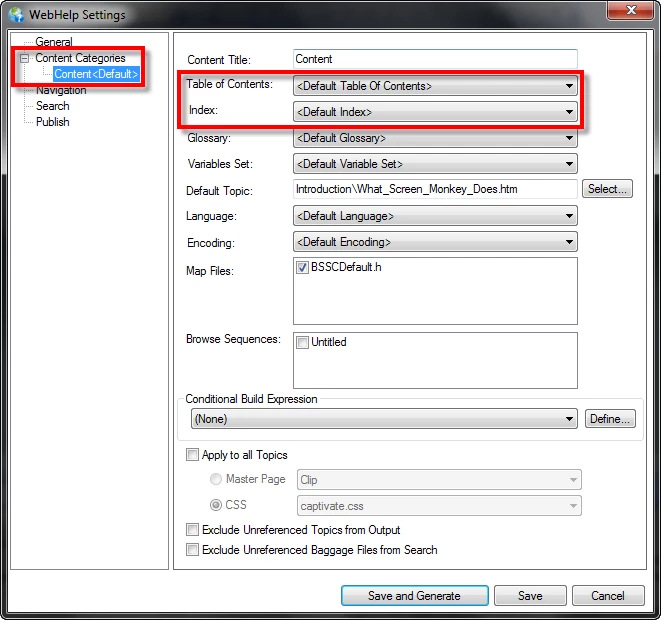
For either situation, you adjust the TOC and Index and whatnot by editing the Single Source Layout recipe. See if the image below helps you sort it.

Cheers... Rick

3 replies

Participant
March 4, 2014

I have the same problem. As I can't "freeze" my help creating a new help for each language (written in Italian but translated in Spanish, French and English) because it's "in fieri" every day, I created a table in each topic: every cell represents a language and I used CONDITIONAL BUILD TAGS (each for every language) to assign the language to each cell.

In this way the synchronization between languages is not easy but it's the only way I've found to manage this situation.

I've made the same thing with the TOC, creating 4 TOC, one for each language, always under conditional build tags.

Benefit: synchronization between languages easier than mantaining more projects

Handicap: the help becomes very big and I had problems with robohelp 9 to manage tags (solved with the 10 version)

Adobe Employee
March 4, 2014

Hi SilviaColombo

Thanks for sharing your workflow. That seems fine to me.

What about keeping a separate topic for each language and apply CBT on topic itself?

Now you can keep single TOC or  language specific multiple TOC. In case of single TOC, in the output TOC will anyway remove the reference if the linked topic is not in the output.

Other option could be make multiple project and create one of them (or English one) as merged project by putting TOC reference of other locale project. We can keep might be single entry of merge project reference in language specific TOC. In case of merge project you can share different content / resources (topic too in RH 11) through Resource Manager.

Please share your thought.

Thanks

March 3, 2014

Hello,

Thanks for putting the question up. I have the same question and I still haven't found an answer.

I am wondering if I shoud create the other language versions within the same project or if I should create separate projects for each language.

I am interested in the advantages/disadvantages and some best practice.

Are there any users who could give me some advice on this?

What did you decide to do, Matt?

Thanks!

Peter Grainge
Community Expert
Community Expert
March 3, 2014

The first post in this thread is based on creating separate TOCs etc for each language.

See also this thread. http://forums.adobe.com/message/5326154#5326154?tstart=0#5326154


See www.grainge.org for RoboHelp and Authoring tips

@petergrainge

Use the menu (bottom right) to mark the Best Answer or Highlight particularly useful replies. Found the answer elsewhere? Share it here.
Captiv8r
Captiv8rCorrect answer
Legend
February 20, 2014

Hi there

Are you wanting users to be able to be using perhaps a French help output and suddenly change so they see Spanish? Or are you just wanting to make sure your French or Spanish version of the TOC and Index are presented?

For either situation, you adjust the TOC and Index and whatnot by editing the Single Source Layout recipe. See if the image below helps you sort it.

Cheers... Rick

Participant
February 20, 2014

Yes. Don't know how I missed that. I had set up separate content categories already but forgot to specify the TOC, index, etc. (Probably hadn't created the other TOCs at the time.) THX.

So.... Is this the standard method of presenting multilingual help? Or is it a bunch of separate single-language help systems? What do you typically do?

Captiv8r
Legend
February 20, 2014

Hello again

Personally, I've never had a need nor have I ever actually developed for more languages than English. But having said that, it's worth noting that while it's possible to use the Content Categories feature for this, ultimately it may not be the best approach. While the TOC and Index and Glossary might be in the correct language, the surrounding skin would remain in whatever language it was programmed in.

So while the TOC may read differently, the buttons in the main toolbar will not change. Because of that, you might want to use separate projects.

Cheers... Rick