Inspiring
April 22, 2016
Answered

Multiple issues with embedded DHTML Dropdown Text Boxes

  • April 22, 2016
  • 2 replies
  • 2102 views

We recently upgraded from RH 10 to RH 2015.  We know one dhtml drop-down text issue existed before the upgrade, and the upgrade did not resolve it.  We have another more serious issue now.  We are not certain it began with the upgrade, but we detected it after having converted our projects to RH 2015 and republishing them.  I'm listing both of them here in case they are connected.

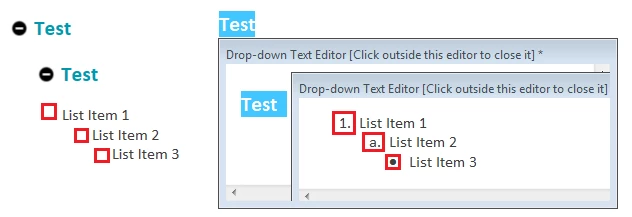
The known issue: The multilevel list styles work at the main topic level and inside the first-level dhtml drop-down text box.  However, if we add a drop-down text box within a drop-down text box and apply a multilevel list style to text within the embedded dhtml drop-down text box, the topic appears fine on the design tab but loses the outline numbers and/or bullets in the preview and in the published version.  Any idea what would cause the list not to display properly or how to get the multilevel list styles to work in this situation?  (Yes, we know we can use list styles instead of multilevel list styles, but that is problematic, too)
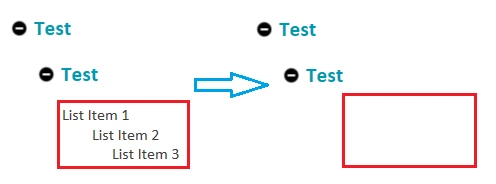
The new issue is that, when the content is published and viewed in either IE or Chrome (the two main browsers our customers use), the embedded dhtml drop-down text link is still present, but the text within the embedded dhtml drop-down box is gone (i.e., nothing happens when you click the link to open to text box).  It works in the preview, but not when accessed via a browser (whether accessing the webhelp content after publishing it to a server or directly from my local machine).  Any ideas on how to get it to display?  The net result for our users is that a SUBSTANTIAL amount of the help content is now no longer accessible.
Thanks in advance for any assistance you can provide with these issues!
This topic has been closed for replies.
Correct answer Captiv8r

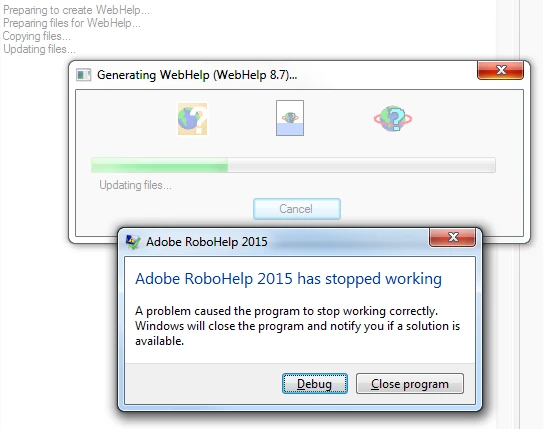
I chose the option to upgrade the project.  I received the message that the upgrade completed successfully.  I have tried multiple times since then to regenerate the project, and I am receiving this error message:

The first time I tried generating the webhelp, I did nothing differently; I just expected it to work.

The second time, I tried deleting the .cpd file.  I noticed the system recreated it with a 4/22/2016 date (which was last Friday and would have been before the "update/upgrade" today) instead of today's date.

I noticed an .ldb file (which I recognize as a "live data base" file).  Good or bad, I deleted that file, too, in addition to re-deleting the .cpd file, and rebooted.  The system re-created the .cpd file today's date.

Each time, the system still crashed with the same message listed above.

I plan to contact Adobe Support.  Just the same, anyone else run into anything like this and/or have suggestions on how to proceed?  Thanks!

Tim


Here are a couple of things I'd consider trying.

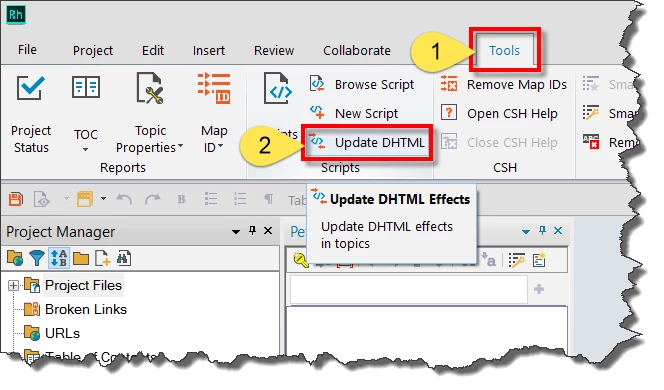
First, click Tools > Update DHTML and let it do its thing.

Test to see if anything changed. If so, terrific!

If problems persist, open one of the sample projects. Click here for a video on how to do that

Then open Windows Explorer. Click here for a video on how to do that

Find and copy a file named ehlpdhtm.js and return to your current project and paste that file in so it replaces the one that is there.

Then see if things are any better.

Cheers... Rick

2 replies

Inspiring
January 25, 2017

Rick,

We are using RH10 and tried the DHTML update with no luck.  We are using snippets which appear in dropdown boxes within numbered lists.  Basically we have complex instructions and the snippets allow us to use one simple instruction line and if our tech needs to know the details, they expand the dropbox.  If I put a DHTML drop box inside a snippet at the second level, all the numbering goes away.  The only way to get things numbered is to put the numbers as text in a paragraph. p>1<p which defeats the purpose of numbered lists.  Also, sometimes our snippets get used inside a second level drop box (not snippet inside snippet) and then the snippet loses its numbering.  Are there any ways to work around this?  We have tried several list styles and some take on the numbering of the styles above (very annoying) while others don't.  We have got that sorted out but now we are just down to missing numbers within drop boxes inside snippets. (nested drop boxes).  They are very handy or could be more handy if the numbering worked properly.

Thanks,

dv

Inspiring
January 25, 2017

I would never use p tags for numbered procedure - it's not the right HTML tag. You should use ol for ordered lists, ul for unordered lists, and li for list items. If you have your numbering set up with those tags and the snippets, will it display correctly?

Inspiring
January 25, 2017

If course p tags are not the right tag, that is the point here, but it is the only way I can get numbers to appear in my nested dropdown boxes.

</p>

          <ul>

                    <ul>

                               <li class="p-Note"><p class="Note">Note: The note starts here but is missing the image for the note and all the
                                 rest of the numbered lists……
</p></li>

                     </ul>

          </ul>

          <?rh-list_start level="1" an="1" class="rl-p-Number-1-SnippetSteps"          

                                   style="list-style: rh-list; list-style: rh-list;" ?><p

                    class="Number-1-SnippetSteps" style="margin-top: 1.5pt;

                     margin-bottom: 0pt;">And the text for step 1 starts here. Number1 snippet steps is

                    one of several styles to restart  numbering so that the numbering restarts at 1 rather

                    than taking on the next number is any list above. </p><?rh-list_end ?>

                     <ul>

Jeff_Coatsworth
Community Expert
Community Expert
April 22, 2016

Are you totally patched up in RH2015? There’s been a couple of patches since the release.

Inspiring
April 22, 2016

Since I haven't applied any patches yet, the answer to your question is no.  Will look, but if you could point me in the direction of where I need to go/what I need to do to apply the patches, that would be great.  Thanks.

Jeff_Coatsworth
Community Expert
Community Expert
April 25, 2016

Should be as simple as going into Help > Updates inside RH, but if that doesn't work, you can always get them from here - Adobe - Support : RoboHelp Support Center : Service Releases