
Inspiring
August 7, 2018
Question

My RoBoHelp 2017 project is not displaying correctly in Chrome or IE but is correct in Firefox and Edge when navigated to from a link in our software.

  • August 7, 2018
  • 2 replies
  • 786 views

I've created a 'user guide' with RoBoHelp 2017 that uses Azure_Blue layout generated as a Responsive HTML 5.  It looks fabulous when using the index.html from my computer in Chrome, Internet Explored, Edge and Firefox.  When I open the 'user guide' from the link in our software (from the internet) it looks great in Edge and Firefox but I receive the following in IE and Chrome:
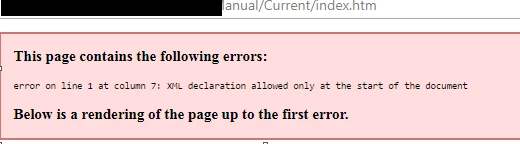
My software developer believes it has something to do with the following blank area:
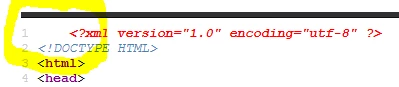
Any thoughts?

This topic has been closed for replies.

2 replies

colleenpcAuthor
Inspiring
October 9, 2018

When generating the output I deselected under Optimization > Use Adobe Captivate HTML5 output, that corrected the XML issue in Chrome.

Firefox and Edge still worked, but not IE.

Further investigation by one of our developers determined IE
not rendering the site. This was fixed by updating a function in the
(our company) application that was only allowing PDF file types to be handled correctly,
which was interfering with the rendering.

Peter Grainge
Community Expert
Community Expert
August 7, 2018

If you do a View Source in the RoboHelp Tour​ you will see that line is not there.

That is created with RoboHelp 2017 with Update 2 applied and a new skin selected from the Gallery button after applying the update.

I am not do doing anything to suppress that line and it's not in another output I checked.

Question is what is putting it into your output?

I do see that in source topics so I'm wondering if somehow your source topics are getting the output.


See www.grainge.org for free RoboHelp and Authoring information.

@petergrainge

Use the menu (bottom right) to mark the Best Answer or Highlight particularly useful replies. Found the answer elsewhere? Share it here.
colleenpcAuthor
Inspiring
August 8, 2018

Peter,

Thank you for responding.

I am new to RoBoHelp.

I have taken this project over from a predecessor, unaware of what version was previously used.

I have RoBoHelp 2017 installed on my computer.  I made updates/edits to all child projects and the master project.  Could the issue be from combining them?  I used the Azure_Blue layout and the preexisting style sheet (style format).  In the preexisting material were videos and images, I reused as many of these as possible.

I see no space in your material.

I don't see a space when opening the index file directly from my computer either.

I see the space in Firefox and Edge but they still display correctly.

Suggestions?  Should I download or update?

Thank you for your time.

Regards,

Colleen

Peter Grainge
Community Expert
Community Expert
August 8, 2018

You are missing an important point. You say you don't see space in my topics, the point is you don't see that line at all.

In RoboHelp you have source topics and you generate outputs, the two have different HTML code in them. What you are showing me looks like a source topic but you are saying it is output. That makes me think somehow the two have got mixed.

Have you maybe given your developer source topics from your project rather than the output you generated?


See www.grainge.org for free RoboHelp and Authoring information.

@petergrainge

Use the menu (bottom right) to mark the Best Answer or Highlight particularly useful replies. Found the answer elsewhere? Share it here.