
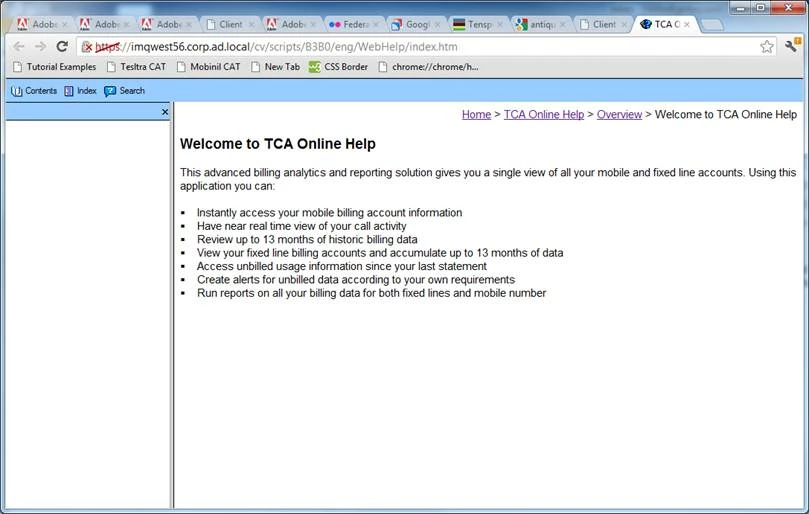
Navigation column left blank in Chrome/Firefox
We're in the process of migrating our exisiting help content over to RoboHelp. I've generated WebHelp content using Robohelp 9.0.1.262 and moved it to a server. Unfortunately when I open the content in a web browswer, the left-most navigation panel will not load. I've searched these forums far and wide for an existing topic and didn't find an issue quite like mine. I downloaded and installedAdobe's 'RH9 Issue 954 Fix' with the whutil.js fix to no avail.
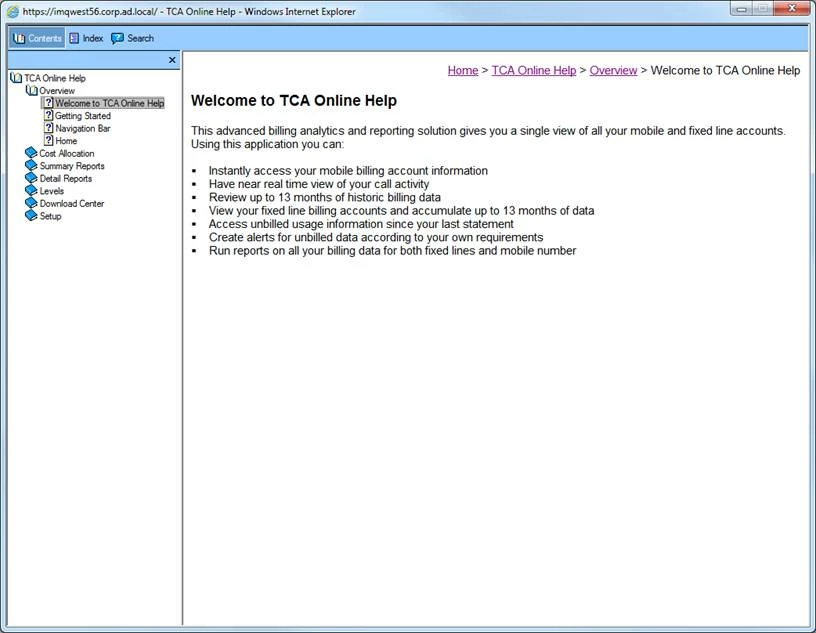
When I click on our 'online help' link from our https server which links to RoboHelp's index.htm, the left navaigation column is left completely blank in chrome 21.0.1180.60 and firefox 14.0.1, but populated in IE9.
There seem to be tons of topics about chrome not working with RoboHelp, but none of them mention the same behavior in Firefox or that IE functions correctly. Any help with this would be greatly appreciated. Screenshots attached below.
Chrome/Firefox screenshot
IE9 screenshot


 AdChoices