
Participating Frequently
November 11, 2010
Answered

Navigation pane disappears when the focus is changed

  • November 11, 2010
  • 1 reply
  • 690 views

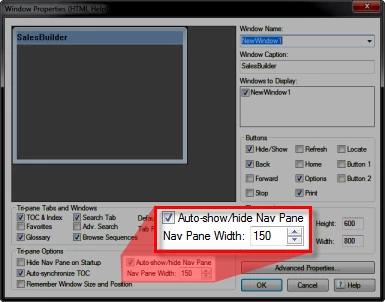
I using Robohelp 7.01.001 and am generating a Microsoft HTML Help (Primary Layout). When I open up the CHM file everything looks fine, but when I change the focus off of the Help file the navigation pane hides. Is there a setting to always show the navigation pane?
This topic has been closed for replies.
Correct answer Captiv8r

Welcome to our community

If you edit your Window definition you should see an option labeled Auto-show/hide Nav Pane.

If this option is enabled, clear it and you should be golden. If it's not enabled, enable it and click OK. Then disable it and click OK.

If the steps listed earlier don't seem to resolve the issue, perhaps try creating a new window and defining that as the window for your CHM file.

Cheers... Rick

Helpful and Handy Links

RoboHelp Wish Form/Bug Reporting Form

Begin learning RoboHelp HTML 7 or 8 moments from now - $24.95!

Adobe Certified RoboHelp HTML Training

SorcererStone Blog

RoboHelp eBooks

1 reply

Captiv8r
Captiv8rCorrect answer
Legend
November 12, 2010

Welcome to our community

If you edit your Window definition you should see an option labeled Auto-show/hide Nav Pane.

If this option is enabled, clear it and you should be golden. If it's not enabled, enable it and click OK. Then disable it and click OK.

If the steps listed earlier don't seem to resolve the issue, perhaps try creating a new window and defining that as the window for your CHM file.

Cheers... Rick

Helpful and Handy Links

RoboHelp Wish Form/Bug Reporting Form

Begin learning RoboHelp HTML 7 or 8 moments from now - $24.95!

Adobe Certified RoboHelp HTML Training

SorcererStone Blog

RoboHelp eBooks

ronb1Author
Participating Frequently
November 15, 2010

Thanks Rick. I was able to find it and get it working (just in time too).