


Sleant
Inspiring
February 7, 2022
Question

Need to pause a URL that has auto play content

  • February 7, 2022
  • 2 replies
  • 301 views

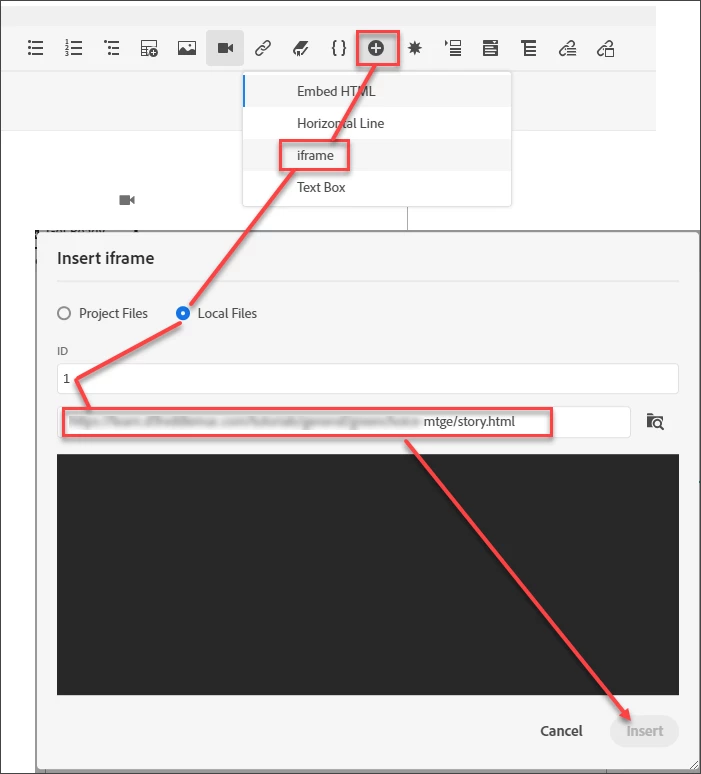
Hello RH Friends - I have inserted "Insert HTML Elements > iframe > Local Files > a URL" that auto plays my Articulate Storyline tutorial/URL. How do I on this topic, in code view, write a code to PAUSE the URL, so that it doesn't play automatically? Thank you so much.
    This topic has been closed for replies.

    2 replies

    Community Expert
    February 8, 2022

    You might be able to, but you'll have to search web developer forums for that. (I suspect the changes would need to be in the articulate files, not in Robohelp, though.)

    Sleant
    SleantAuthor
    Inspiring
    February 8, 2022

    Thank you again, Amebr. Unfortunately, I can't change the auto play in Articulate Storyline because that's what the customer wants when viewing the URL/tutorial as a standalone. They want to include this URL/tutorial as part of the RH help topic.

    Jeff_Coatsworth
    Community Expert
    Community Expert
    February 8, 2022

    I'd be trying to create 2 versions of the Articulate thing - one for standalone playing & one for use with RH's output.

    Community Expert
    February 7, 2022

    While I haven't used Articulate, I'd have thought the play controls were all in the Articulate code as all you're doing is linking to a page generated from Articulate. 

    Sleant
    SleantAuthor
    Inspiring
    February 8, 2022

    Thx again, Amebr. It's all contained and published as an HTML5 with a simple URL/address. I was hoping one would be able to write a code to "pause a URL at start of topic on shown or something like that".