

DebbyT01
Known Participant
April 13, 2012
Question

Need TOC help in RH9

  • April 13, 2012
  • 1 reply
  • 1683 views

I have converted both a WinHelp Project (hpj) and a WinHelp file (hlp) to RH 9, and I cannot figure out how to get the TOC to apear as I would like.   My goal is to have the Chapter Titles from the FrameMaker book file appear in the help file TOC, like this:
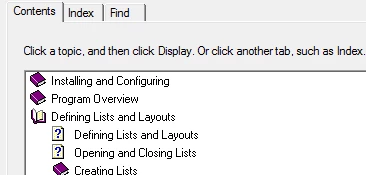
When I converted the hpj, I auto-created the TOC, and got a list of what appears to be every level heading in the book, with the ? icon for all topics.  When I converted the HLP, the TOC appearance was closer to what I was expecting, but instead of using the chapter titles, it used what appears to be the rtf file names, instead of the chapter titles.

The original winhelp files were built using WebWorks Pro, from FrameMaker 7 book files.  I have TCS 3.5, but have not converted the help book file over yet, for reasons waaaaaay too complicated to go into here.

Can somebody steer me in the right direction?

Thanks!

This topic has been closed for replies.

1 reply

Jeff_Coatsworth
Community Expert
Community Expert
April 13, 2012

Well, if you don't want to go the route of TCS, then you're left with manually messing around with the ToC in RH. Not sure what answer you expected. You say you've got a ToC with too much stuff - start pruning the ToC and moving stuff around. There's not necessarily any relation to the structure of your ToC and your topics in your project.

BTW - going the TCS route is fairly easy

DebbyT01
DebbyT01Author
Known Participant
April 16, 2012

It is not a matter of not wanting to go the route of TCS, it is that the product I am writing for needs to have the help files in a format not supported by RH9. I have to keep my Frame files in FM7 in order to generate the required output via the archaic WebWorks Pro. I am working with RH to develop a compatible output so that I can move forward with the TCS migration.

As a new RH user, I was looking for advice on a potential setting (that I’m not yet aware of) that would allow only specific levels of headings to be included in the TOC.

Inspiring
April 16, 2012

Thanks rlauriston – I thought that by converting an existing project or help file, I would get only the levels I want, since that’s what is in the original files. I will take a second look at what exactly is included in the source files.


That's how it works for me. Using the default WebHelp settings, when I import a FrameMaker project, only the headings in the "Included" list in the Set Up Table of Contents dialog in FrameMaker show up in the TOC of the generated WebHelp. In RoboHelp, the FrameMaker Document Settings dialog has Convert FrameMaker Table of Contents checked and "Create new associated TOC" selected.