


Participant
April 13, 2023
Question

New UI - TOC output in Word not linking to CSS

  • April 13, 2023
  • 4 replies
  • 333 views

Hello, 


I am new to RH and currently trialling version 2022.1.187. Right now I am having to export to Word since I am having an issue exporting to PDF (assuming because of OS Ventura). The issue I'm having is that the CSS for the TOC is not linking to the output. 

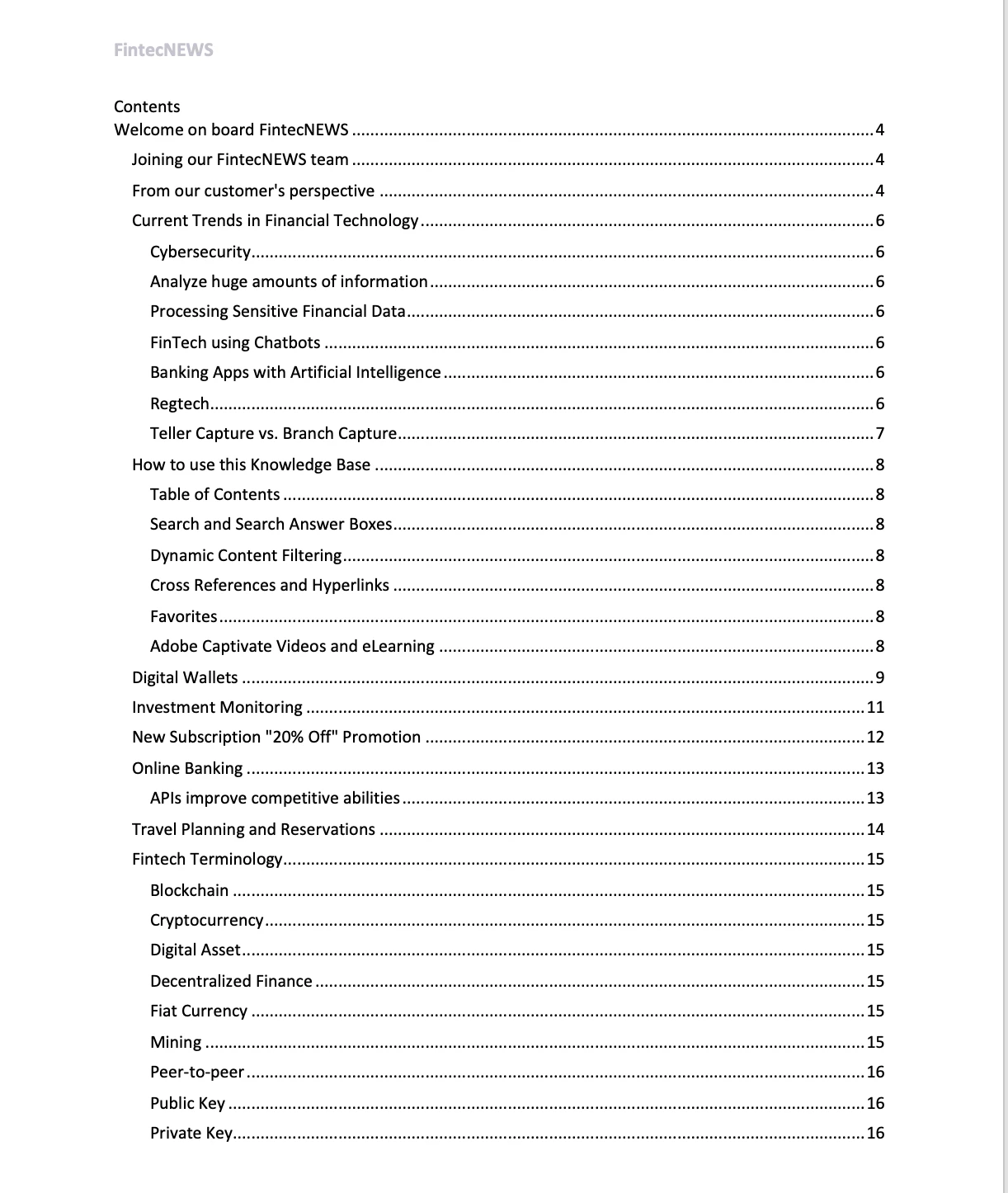
I have tried this on my own project, as well as with one of the sample projects and the issue persists. I've included an image below. It appears the header and footer styles from the TOC page layout are being pulled to the output, but not the body/heading styles. Is there a way to fix this?

This topic has been closed for replies.

4 replies

Peter Grainge
Community Expert
Community Expert
April 15, 2023

This is what I set up.


This is what I get.


This is my TOC.


Do your settings tally?

________________________________________________________

My site www.grainge.org includes many free Authoring and RoboHelp resources that may be of help.


Use menu (bottom right) to mark as Best Answer or to Highlight particularly useful replies. Found the answer elsewhere? Share it here.
Peter Grainge
Community Expert
Community Expert
April 14, 2023

Have you looked in the template style sheets?


________________________________________________________

My site www.grainge.org includes many free Authoring and RoboHelp resources that may be of help.


Use menu (bottom right) to mark as Best Answer or to Highlight particularly useful replies. Found the answer elsewhere? Share it here.
Participant
April 14, 2023

Yes - I would expect the body and heading styles should just pull from the stylesheet but they are not. I have made some changes to the stylesheet that should be really evident in the export but it is not behaving as expected. Is there another way to edit the look of the TOC? 

Peter Grainge
Community Expert
Community Expert
April 14, 2023

Oops. Thanks @Jeff_Coatsworth 

________________________________________________________

My site www.grainge.org includes many free Authoring and RoboHelp resources that may be of help.


Use menu (bottom right) to mark as Best Answer or to Highlight particularly useful replies. Found the answer elsewhere? Share it here.
Peter Grainge
Community Expert
Community Expert
April 14, 2023

Try applying update 2, some TOC changes were made. See if they fix the problem.


You will not be able to apply it from Help > Check for Updates. Follow this link and click the link in the red box.

________________________________________________________

My site www.grainge.org includes many free Authoring and RoboHelp resources that may be of help.


Use menu (bottom right) to mark as Best Answer or to Highlight particularly useful replies. Found the answer elsewhere? Share it here.
Jeff_Coatsworth
Community Expert
Community Expert
April 14, 2023

I think the link that Peter's referring to is this one - https://helpx.adobe.com/robohelp/using/whats-new-robohelp-2022-release-update-2.html