

NocturneGames
Participating Frequently
September 10, 2020
Answered

No translation button in Authoring? (Robohelp 2019.0.14)

  • September 10, 2020
  • 4 replies
  • 412 views

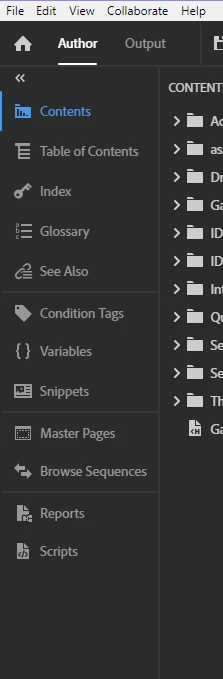
On both the Adobe help docs for Robohelp (here: https://helpx.adobe.com/in/robohelp/user-guide.html/in/robohelp/using/translation.ug.html) and on an independent site (here: https://www.grainge.org/pages/authoring/rh_tour/rh2020/authoring/translations.htm) it talks about clicking the Translations button in the author section on the left of the IDE. However I don't see this option in my project... So, do I need to configure something first to get that option? Has it been removed? The Author panel for my project looks like this currently:


This topic has been closed for replies.
Correct answer Karin Albrecht

Hello,

As far as I can see, both linked help files refer to Robohelp 2020. You are using Robohelp 2019. So, I guess you will have to go for the new version, if you want to use the translation option.

Best regards
Karin

4 replies

Mark_Alexander
Participant
September 10, 2020

Thank you both for the replies. I'll speak to my manager about getting the 2020 update (as the 2019 updater tells me that everything is up to date... 😞  )

Community Manager
September 10, 2020

Correct, the Updater only gives you updates within one major version (in your case, updates for the 2019 release).


Do you have a RoboHelp 2019 subscription? In that case, you can simply download, install, and use the latest release here:

https://www.adobe.com/products/robohelp/download-trial/try.html

No need to buy an update.


If you had bought a perpetual license for RoboHelp (2019 release), you can simply subscribe to the latest release here:

https://www.adobe.com/products/robohelp/buying-guide.html#Individual


Cheers,
Stefan

Community Manager
September 10, 2020

And in the Summer 2020 release version, you can find it at the bottom of the Author panel:


NocturneGames
Participating Frequently
September 10, 2020

Okay, that would indeed explain the issue... Thanks!

Karin AlbrechtCorrect answer
Legend
September 10, 2020

Hello,

As far as I can see, both linked help files refer to Robohelp 2020. You are using Robohelp 2019. So, I guess you will have to go for the new version, if you want to use the translation option.

Best regards
Karin