
Inspiring
September 22, 2016
Answered

Numbered Lists with Dynamic Content Filtering

  • September 22, 2016
  • 6 replies
  • 3147 views

I couldn't find this information anywhere, though I would imagine I'm probably not the first person to encounter this issue...

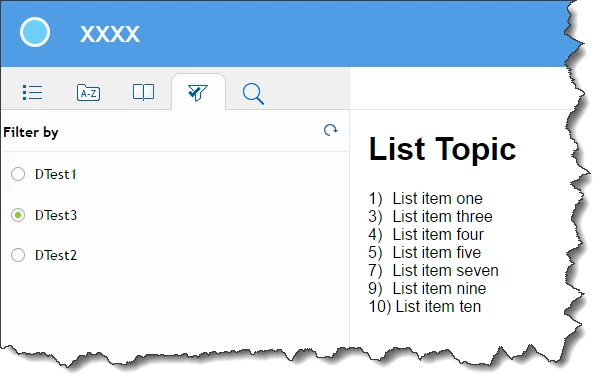
I have some topics where the steps in procedures are presented with numbered lists. I'm using Conditional Build Tags on some of the numbered steps to filter them out when specific filters are applied in the Responsive HTML5 output. When I look at a topic in the preview mode and apply filters, the list numbers automatically renumber to avoid skipping numbers. However, when I generate the output and then apply the filter, the rows disappear as expected, but the numbered lists skip the filtered numbers.

For example:
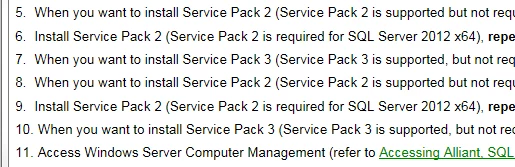
This filters as shown in the preview:

But in the generated output, the numbering is way off:

Is there any way to make this number correctly?
This topic has been closed for replies.
Correct answer Captiv8r

Yep, just tested on my end with a multi-numbered list. And in that list type, things go to pot!

Seems the fix is to avoid using that list type. Pretty easy to accomplish. Select first and last bit of list and click the multilevel icon. then simply apply numbers.

Cheers... Rick

6 replies

CN13579Author
Inspiring
January 18, 2019

I wouldn't know what to put in a dummy project to make it not work. Our main help project is massive and uses many, many user-defined variables, has something like 1700 topics, uses javascript to obtain custom terminology from our application, uses content filtering heavily, and etc. I don't know which, if any, of these things causes problems in RH 2019. It would be impractical to try to make a dummy project like ours for testing. The conversion process seems to think it is successful, but I get this application error window popping up when I try to poke around the project:

I tried generating one of the sample projects that comes with RoboHelp and it seemed to work.

I'm not sure about a shared screen session. I would have to discuss it with our team. Does RoboHelp have any debugging information logged that I can bring up? Will Scripting be added to RoboHelp 2019 at any point? If it isn't we're thinking about moving from the subscription to a purchased copy of RH 2017 because we rely so heavily. It sounds like further development is going to leave that feature out.

CN13579Author
Inspiring
January 11, 2019

I just want to bring this up again for visibility. It's been over two years since we reported this problem. We've been told several times that it should work and have had a few bug reports closed, and yet it does not work. I do not know if it works in RoboHelp 2019 as we cannot use it. It does not work with Robohelp Classic included with RoboHelp 2019 (Latest update 14.0.4.206).

Tracker

Adobe Employee
January 12, 2019

Hi CN13579

Bug has been resolved for 2019 only. In 2019 multi level list technology has been revamped and it is based on standard CSS3 and HTML5 now which makes it work correctly in the case of dynamic content filtering now. In Classic it was a custom implementation which tried to mimic the list behaviour so it was not possible to fix it there. From the screenshot above it seems like your list is single level only, don't you have the option to use the standard HTML list only? Is it possible for you to let us know the blockers for you in 2019, we will try to expedite the resolution?

Thanks,

Vivek

CN13579Author
Inspiring
January 14, 2019

Our lists are multi-level. You're only seeing one level in the screenshot.

I can't say what prevents us from using Robohelp 2019. I didn't try using it for long. I upgraded our main project and it was a mess. It was missing content and the formatting and styles were also off. Some topics seem to be cut off in the middle of the page with the rest of the content just gone. Our project is very large with over a thousand topics so tweaking it to work with RoboHelp 2019 would be a massive undertaking. We also rely on javascript in many places and the scripting feature was removed, so that alone is enough to disqualify RoboHelp 2019 for us.

Here's an example of a topic generated with RoboHelp Classic on the left looking as intended, and RoboHelp 2019 on the right. You can see that the RoboHelp 2019 version ends after the Purged list item, while the RoboHelp Classic has much more content on the page. RoboHelp 2019 also seems to have failed to carry over the styles of the topic/project. I looked at the css file and it was blank. It looks like RoboHelp 2019 tried to copy the css file and failed. These are just the problems I noticed with a quick inspection.

CN13579Author
Inspiring
July 18, 2017

I recreated this bug (sort of) in the bug base. We're still waiting for this to be fixed. If anyone wants to vote for it, here's a link:

Tracker

CN13579Author
Inspiring
June 6, 2017

Are they likely to fix this? We just upgraded to Robohelp 2017 and it's still broken. It seems like a pretty big flaw when dynamic content filtering is one of their big features now.

Jeff_Coatsworth
Community Expert
Community Expert
June 7, 2017

Looks like it's now called "Tracker" - Tracker - have a look & see if your issue in there...

CN13579Author
Inspiring
June 7, 2017

The search is not working for me now... It just spins endlessly. I do remember searching this new tracker before and not finding it which is why I asked if they wiped out all of their old bug reports.

I'm sincerely wondering if something happened at Adobe recently. We had a really hard time navigating their site to download the new applications and their communication and documentation seem to have taken a step down in quality.

Captiv8r
Captiv8rCorrect answer
Legend
September 23, 2016

Yep, just tested on my end with a multi-numbered list. And in that list type, things go to pot!

Seems the fix is to avoid using that list type. Pretty easy to accomplish. Select first and last bit of list and click the multilevel icon. then simply apply numbers.

Cheers... Rick

Jeff_Coatsworth
Community Expert
Community Expert
September 23, 2016

And then go file a bug report to get it on Adobe's radar ;>)

Captiv8r
Legend
September 23, 2016

Hi there

Have you looked to ensure you haven't applied a specific start number to some of the stuff? I tested my own RoboHelp 2015 Release and the numbers filter out and maintain the numbering just fine. For example, if I have a list like this:

1. List item one

2. List item two

3. List item three

And the filtering removes list item two, my list looks like this:

1. List item one

2. List item three

For the items that aren't following the numbering, I'd look at the list to ensure it doesn't resemble this:

Cheers... Rick

CN13579Author
Inspiring
September 23, 2016

Thanks for the reply. Did you try generating your list in Responsive HTML5 format? It works fine for me when I use the Robohelp preview feature, but when I actually generate the Responsive HTML5 output, it does not work. I have not specified any special numbering or restarts to the list.

The list numbers seem to be hard coded in the html, so I'm guessing this is not something that it can do at run time?

Jeff_Coatsworth
Community Expert
Community Expert
September 23, 2016

Can you show us an example of how the list numbering is appearing in the HTML output? I'm pretty sure you shouldn't be seeing the actual numbers if your list is defined correctly...