
Participating Frequently
July 13, 2017
Question

Online help shows different font sizes on different browsers

  • July 13, 2017
  • 1 reply
  • 394 views

Hello,

Online help is rendering different font sizes when viewed in IE/Chrome. 

  • On the left you see Chrome and the fonts look fine.
  • On the right you will notice the first set of  bullets shows a larger font size. 
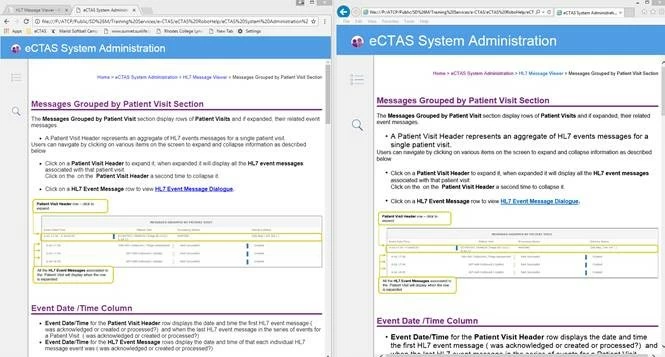
Any idea what could be causing this?

Thanks!

This topic has been closed for replies.

1 reply

Captiv8r
Legend
July 13, 2017

Hi there

One of the first things I'd check for would be to see if both browsers are set for the same zoom level. For each browser, press Ctrl+0 and see if anything changes.

Note that the keypress is Ctrl+ (zero).

Cheers... Rick

Peter Grainge
Community Expert
Community Expert
July 13, 2017

... and after that, check in the source that a style has been applied so

that the content is not being rendered by the browser's css.

Use the menu (bottom right) to mark the Best Answer or Highlight particularly useful replies. Found the answer elsewhere? Share it here.
Peter Grainge
Community Expert
Community Expert
July 14, 2017

Is this resolved now?

If not, try the previous advice and temporarily switch to a different CSS. The appearance may differ from what you want but likely will be the same in both browsers.


See www.grainge.org for RoboHelp and Authoring information

@petergrainge

Use the menu (bottom right) to mark the Best Answer or Highlight particularly useful replies. Found the answer elsewhere? Share it here.