
June 14, 2012
Question

Open All / Close All Books/Topics

  • June 14, 2012
  • 1 reply
  • 1055 views

Hi,

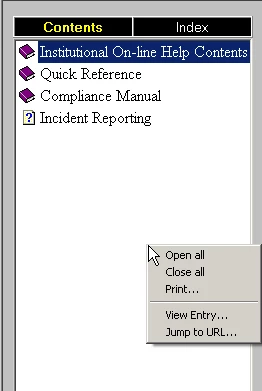
I was using Robohelp Version 7.0 and had a functionality to Open All/Close all Books after deploying the project on the web as shown below.

Now I have created new project in Robohelp 9.0 but now after deploying the new project on the web, I have lost this functionality. Please advise,

I will really appreciate your help.
This topic has been closed for replies.

1 reply

Captiv8r
Legend
June 14, 2012

Hi there

Your image doesn't really look like WebHelp from RoboHelp. Even from what I recall with version 7.  Were you using RoboHelp for Word maybe?

WebHelp has never had any ability to expand all books to my knowledge.

Cheers... Rick

Helpful and Handy Links

RoboHelp Wish Form/Bug Reporting Form

Begin learning RoboHelp HTML 7, 8 or 9 within the day!

Adobe Certified RoboHelp HTML Training

SorcerStone Blog

RoboHelp eBooks

June 15, 2012

Hi,

Thanks for getting back to me.

I was using Robohelp 7 HTML. The image I attached earlier was after  deployment of online help files to the web server. As you can see from the image, when I used to right click on the table of contents, I was able to close all books. There was a option to Close all and Open all

I have found a way to close all openend books at once in my new project (Robohelp 9.0) yesterday. After deploying on the webserver I selected my first topic (For me it was Updates.htm) then after F5 or refresh the table of contents will close all open books at once.