Participating Frequently
December 16, 2013
Question

Ordered and Unordered Lists viewed in WYSIWYG Editor in RoboHelp 10

  • December 16, 2013
  • 1 reply
  • 759 views

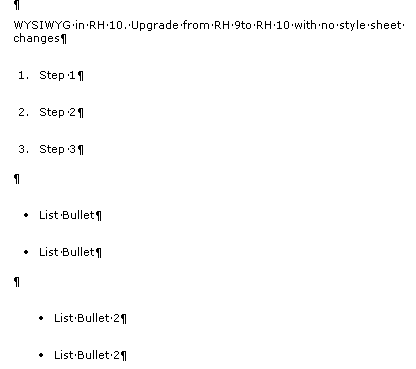
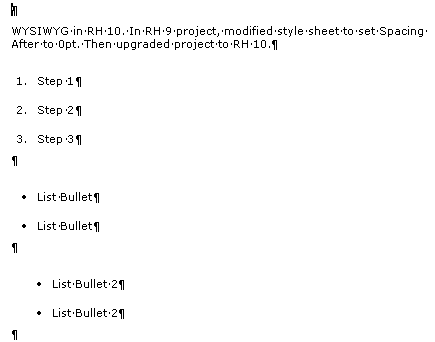
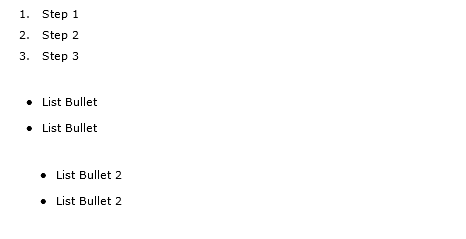
I recently upgraded a project from RH 9 (9.0.2.271) to RH 10 (10.0.0.287). Ordered and unordered lists display in the WYSIWYG Editor with more spacing around each line. When I generate the output to HTML Help, the spacing looks fine. I also tested generating output to WebHelp, and again, the output looks fine.

I have paragraph and list styles defined in my style sheet that I apply to the text in the topic. I also looked at the styles in RH 10 and Media is set to "None."

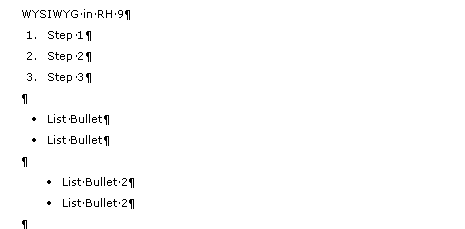
Using the Style Pod, I looked at the set up of the parapgraph and list styles. For those styles, (and my body text styles - which look fine in the WYSIWYG Editor) have spacing before and after spacing set. (NOTE: These styles were created in RH8 and the WYSIWYG Editor displayed the styles appropriately in RH8 and RH9.) Even though I changed the style sheet, the WYSIWYG Editor is still displaying more space around the styles then I am expecting.

I know this is not a huge issue since the output looks fine, but I want to understand why the WYSIWYG Editor isn't working as I expect. I would like the editor to display with correct spacing.

I attached a few screen captures showing what I see.
HTML Help Output
Thanks in advance for your help.

This topic has been closed for replies.

1 reply

Peter Grainge
Community Expert
Community Expert
December 18, 2013

Can you recreate this in a new project that you can send me.

See the Contact page on my site and send the project as instructed there. Do make sure you include a link to this thread and please do not email the project direct.


See www.grainge.org for RoboHelp and Authoring tips

@petergrainge

Use the menu (bottom right) to mark the Best Answer or Highlight particularly useful replies. Found the answer elsewhere? Share it here.
Suz93Author
Participating Frequently
December 18, 2013

Peter-

Thank you for your offer to help. I recreated this issue in a new project. I created a new project in RoboHelp 9 and upgraded the project to RoboHelp 10. I followed your instructions and sent the source RoboHelp 10 files.

Regards,

Suzanne

Peter Grainge
Community Expert
Community Expert
December 19, 2013

I have the link to download the project and will do that later today while it is available. I will look as soon as I can.


See www.grainge.org for RoboHelp and Authoring tips

@petergrainge

Use the menu (bottom right) to mark the Best Answer or Highlight particularly useful replies. Found the answer elsewhere? Share it here.