


Inspiring
May 20, 2021
Answered

Output preset will not limit topics

  • May 20, 2021
  • 3 replies
  • 217 views

Hi, Everyone.


I'm having trouble with a MS Word output preset. Before creating the output preset, I create a new TOC that contains only one topic. (Screenshot 1.)


SCREENSHOT 1
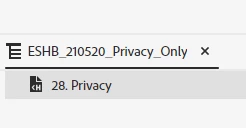
 

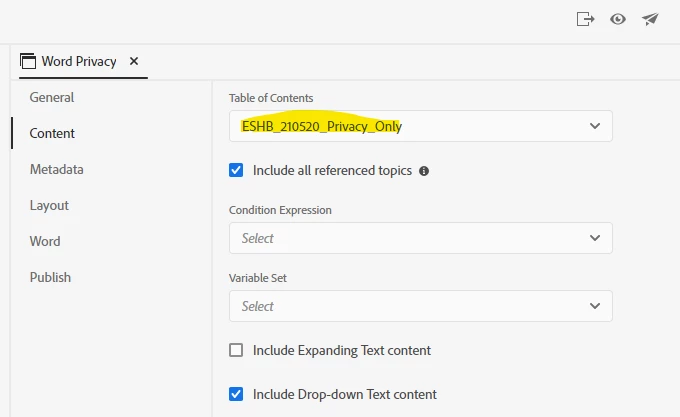
Then I create the MS Word output preset and point it to that new TOC. (Screenshot 2.)


SCREENSHOT 2
 

However, when I generate the output, it contains ALL of my topics. (It should only contain the one topic  that's in the TOC, "28. Privacy")


I'd appreciate any ideas for troubleshooting this. Thank you!

    This topic has been closed for replies.
    Correct answer Amebr

    I think it will be the 'Include all referenced topics' setting.


    If your topic includes links to any other topics, those linked topics will be included. Then if those topics includes links, those linked topics will be included, etc.


    So untick that and you should be right.

    3 replies

    Inspiring
    May 21, 2021

    Excellent, Amber. That solved it, thank you!


    Peter, I don't see where to deselect index or browse sequence. But Amber's trick seems to have given me what I need.


    Thanks so much!

    Peter Grainge
    Community Expert
    Community Expert
    May 21, 2021

    Also did you deselect the index, browse sequence and so on?

    ________________________________________________________
    See www.grainge.org for free Authoring and RoboHelp Information

    Use the menu (bottom right) to mark the Best Answer or Highlight particularly useful replies. Found the answer elsewhere? Share it here.
    AmebrCommunity ExpertCorrect answer
    Community Expert
    May 21, 2021

    I think it will be the 'Include all referenced topics' setting.


    If your topic includes links to any other topics, those linked topics will be included. Then if those topics includes links, those linked topics will be included, etc.


    So untick that and you should be right.