
Inspiring
November 8, 2023
Answered

Output presets are missing

  • November 8, 2023
  • 2 replies
  • 437 views

I'm using 20223.93 on Windows.

For one of my projects (not all), the output presets are missing from the RH UI. The files are present in the presets folder C:\path\to\RoboHelp Projects\this_project\publish\presets but they don't appear in the Output > Output Presets section:
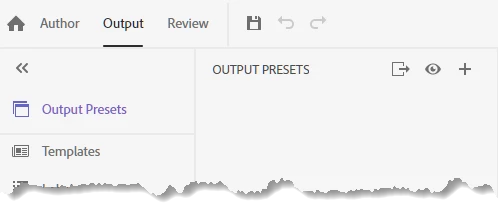
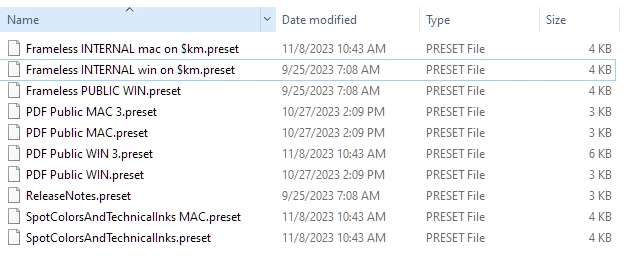
 

I've tried closing the project and exiting RoboHelp. Any ideas why this happened and how I can fix it? 

    This topic has been closed for replies.
    Correct answer KarenMinOR

    Ah ha. Found it: Solved: Output Presets Disappeared and Won't Load - Adobe Community - 11584090
    🙂 Thanks, Peter. This solution worked for me.

    2 replies

    Peter Grainge
    Community Expert
    Community Expert
    November 8, 2023

    On the forum home page there are two fields. Use the lower one. 

    ________________________________________________________
    My site www.grainge.org includes many free Authoring and RoboHelp resources that may be of help.


    Use menu (bottom right) to mark as Best Answer or to Highlight particularly useful replies. Found the answer elsewhere? Share it here.
    KarenMinORAuthorCorrect answer
    Inspiring
    November 8, 2023

    Ah ha. Found it: Solved: Output Presets Disappeared and Won't Load - Adobe Community - 11584090
    🙂 Thanks, Peter. This solution worked for me.

    Peter Grainge
    Community Expert
    Community Expert
    November 8, 2023

    I can't search for you but I know this has been asked before. 

    ________________________________________________________
    My site www.grainge.org includes many free Authoring and RoboHelp resources that may be of help.


    Use menu (bottom right) to mark as Best Answer or to Highlight particularly useful replies. Found the answer elsewhere? Share it here.
    Inspiring
    November 8, 2023

    I did search but nothing came up. 😛