Participating Frequently
March 28, 2016
Question

Output settings not shown in RoboHelp 2015

  • March 28, 2016
  • 1 reply
  • 1438 views

When I right-click on the WebHelp layout in the Output section, it doesn't show Settings or Properties option to set.
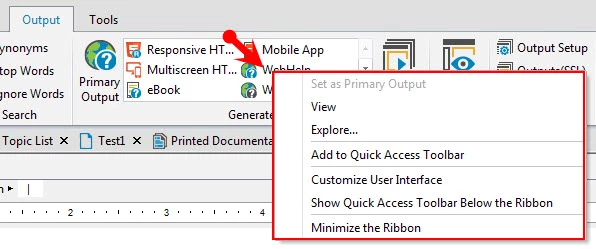
How to set Properties to generate WebHelp and Printed Documentation output.

    This topic has been closed for replies.

    1 reply

    surbhi_maheshwari9120543
    Community Manager
    Community Manager
    March 28, 2016

    Hi,

    For opening properties, you can click the output name e.g. WebHelp, Printed Documentation etc.

    You can also open Outputs(SSL) pod by clicking on it in the output tab which you have shared in image.

    It will open the outputs(SSL) pod with output list and on right-click> Properties option is there.

    Thanks and Regards,

    Surbhi Maheshwari

    Participating Frequently
    March 29, 2016

    Hi Surbhi,

    Thanks for your response.

    When I right-click on the output name (for ex: WebHelp), it shows only pop-up as shown in my earlier post. When I click or double-click on the output name, it doesn't display any pop-up. It was fine up to two days back.

    I am using RoboHelp 2015. The problem is the pop-up with Output Properties is not displayed. Do I need to change any set-up or how can I get the help who can resolve this issue?

    Best regards,

    Kannan

    Community Expert
    March 29, 2016

    I think I can see a button in your screenshot called Outputs(SSL) hiding under the pop-up menu. Perhaps clicking that will bring up the pod in Surbhi's picture, which is where you should be able to access the menu you need. (Just guessing from screenshots, as I haven't upgraded yet.)