


Inspiring
January 26, 2022
Question

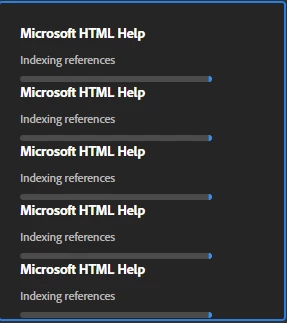
Outputting to Microsoft HTML shows a hanging progress bar 'indexing references'

  • January 26, 2022
  • 5 replies
  • 165 views

When I output a HTML Help with ±100 topics, it generates in ±10s (I see the time change in Explorer), but RH keeps showing the progress bar generating the output with the text 'indexing references'. 

Meanwhile, I can continue editing topics. No problem.

The next time that I generate it, I get another progress bar with the same and so on.

Again I can continue editing without any problem.

The only thing is that all those progress bars keep progressing.

After closing an reopening the project, the progress bars are gone.


As far as I know, the output file is good. So this does not seem to be a big problem, but maybe someone knows the reason and solution?


RH2020.6.76

    This topic has been closed for replies.

    5 replies

    Peter Grainge
    Community Expert
    Community Expert
    January 27, 2022

    The only other thing I can think of is to create a new preset, not a duplicate.


    After that I would try duplicating the TOC twice and deleting different halves of the content. See if one half works and the other doesn't. If that reveals something, keep duplicating and halving until you find the rogue topic.


    If not then I think it is off to Support. See https://helpx.adobe.com/contact/enterprise-support.other.html#robohelp for your Adobe Support options. The email link tcssup@adobe.com is recommended as it reaches a team dedicated to Technical Communication Suite products including RoboHelp.


    Let us now how it goes.

    ________________________________________________________
    My site www.grainge.org includes many free Authoring and RoboHelp resources that may be of help.

    Use the menu (bottom right) to mark the Best Answer or Highlight particularly useful replies. Found the answer elsewhere? Share it here.
    Peter Grainge
    Community Expert
    Community Expert
    January 27, 2022

    Try creating a new window but at first don't change any settings. Select that and see if it compiles. If it does then make any changes you need.


    Does that work?

    ________________________________________________________
    My site www.grainge.org includes many free Authoring and RoboHelp resources that may be of help.

    Use the menu (bottom right) to mark the Best Answer or Highlight particularly useful replies. Found the answer elsewhere? Share it here.
    D.DesmetAuthor
    Inspiring
    January 27, 2022

    It did that but forgot to mention. It returned the same result.

    D.DesmetAuthor
    Inspiring
    January 27, 2022

    @jeff: After I upgrade to patch 7, I will try again. I did not try with the sample project but with another project, and there is no problem with that one.

    @Peter Chater: I waited hours, but it keeps progressing. I compared the output with my the previous project version (made with RH10) and it contains all topics, all index keywords, I can search and it has ± the same file size. I don't see any problem.


    I discovered that if I don't select a default window in the Layout tab of the output presets and compile, RH says shortly after that the output was made and the progression bar dissappears.

    So I compared the window settings with the RH10 project and all settings are exactly the same. They are also exactly the same as my other project that does not have this problem.

    Peter Grainge
    Community Expert
    Community Expert
    January 26, 2022

    The generation is not complete until it has finished indexing references. That can take a while so I'm not clear whether you are allowing it sufficient time.


    Give it longer and see what happens. Maybe also compare another output if you do generate one.

    ________________________________________________________
    My site www.grainge.org includes many free Authoring and RoboHelp resources that may be of help.

    Use the menu (bottom right) to mark the Best Answer or Highlight particularly useful replies. Found the answer elsewhere? Share it here.
    Jeff_Coatsworth
    Community Expert
    Community Expert
    January 26, 2022

    Nope, but maybe try applying Patch 7 and see if it persists - you could also try using the sample project to see if you get the same effect with CHMs or HTML5 outputs as an experiment.