


Page size bug with non Cover or TOC Front matter page and Empty Page issues PDF output
We recently upgraded from Robohelp 2020 to 2022.0.346. This broke our previous outputs presets, so that was a bummer, but the new options seemed like enough of an upgrade to deal with rewriting the template for the new style.
I'm having several issues, the largest 2 being the following:
No layout applied to Front Matter page, making it the wrong size
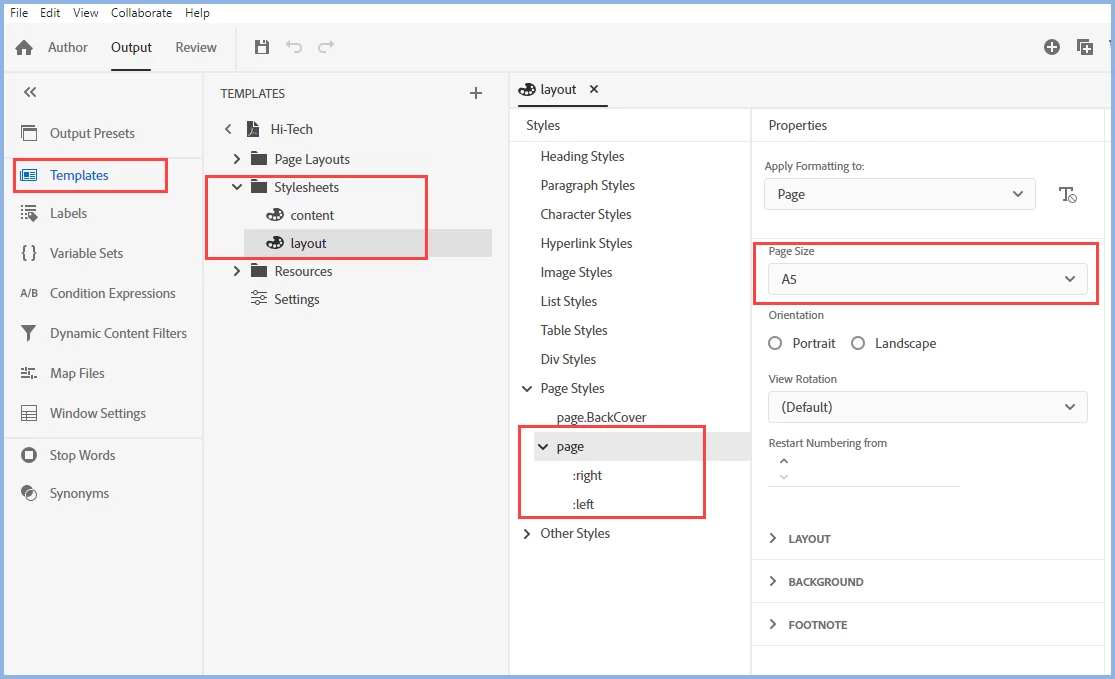
I have a topic with a proprietary warning in it that is the 2nd page of my PDF and is meant to print on the back of the cover when doing dual side printing. I'm in the US, so I print things letter size. I have ensured that every page out in my template has the same size settings, but the proprietary warning page always come out at A4 size in the PDF. I assume this is happening because it is a Front Matter page, but not one of the formally designated special ones and perhaps the Common layout isn't pointing at it correctly. I added text identifying all my page layouts and ran an output and that page doesn't appear to use any of the templates. Is there a way to fix this? I tried making a Topic Layout and pasting the code from the Common layout into that file and applying it to the topic, but it didn't work. I also dug around in the .plt and .tpl files in the template folder and examined them in VS Code outside of Robohelp and tried guessing what the xml for the front matter might be, but was unsurprisingly not successful.
Content inside the Empty_Page Template not visible in PDF
I prefer to start my chapters on Odd pages, so this often causes a blank Even page. It makes sense when looking at the PDF as a 2 page view or in the printed view, but I've gotten so many comments from reviewers using a single page view it is irritating. I was excited to have an empty page layout, but nothing I put in the Contents div on that page is shown, so I can't put "This page intentionally left blank.".
Things I don't like about the 2022
- Covers now live in the template and not the TOC.
- I have to duplicate my previous CSS file that held everything into multiple templates and if I make changes I have to do it to each one instead of simply pointing toward the CSS file in my assets. So far I've continued to use the topics CSS, but the help documentation indicates this may cause cascading style issues, of which I've seen a few already, so I'll have to go and check through everything.
- The Template Page Layouts doesn't have a Preview tab.



 AdChoices