
Legend
April 25, 2014
Question

Paragraph borders in Word-imported content

  • April 25, 2014
  • 1 reply
  • 446 views

Hi

TCS 4.0 -- Using Word 2007 with RH10.

I have a fair knowledge of importing FM to RH, but I am new to importing Word content into RH.

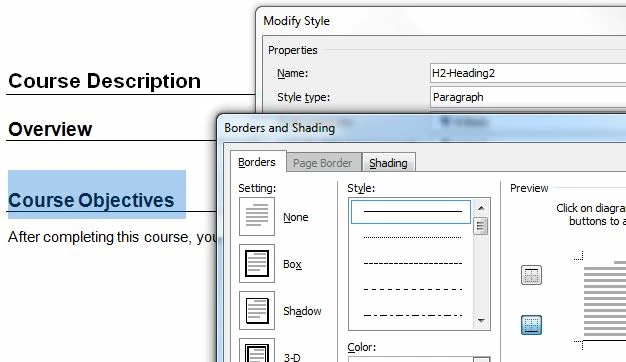
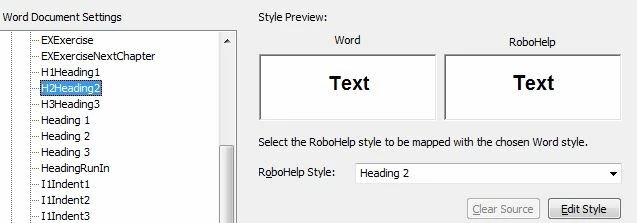
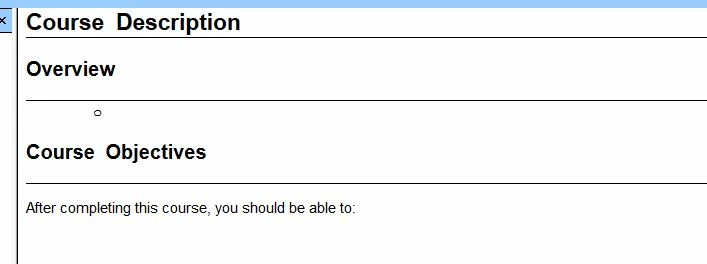
I have used paragraph borders for some styles in Word. For these styles, I have created RH equivalents and mapped appropriately. However, when I import the content into RH, even the paragraph borders defined in Word appear as is.

Paragraph borders in Word:
Word RH Conversion Settings:
WebHelp output
Any idea why this is happening? Please advise.

Sreekanth

This topic has been closed for replies.

1 reply

Peter Grainge
Community Expert
Community Expert
April 29, 2014

Am I not looking at the images correctly as I am not seeing and borders around styles. The highlighted Course Objectives in the first image is not showing any borders.

That said, borders seem to be a law unto themselves. I just imported a document with a border around a style and in Rh I got two borders. The import is dependent on how Word saves a file in HTML format and it had done that by creating a DIV tag which was then superimposed on my Rh style, hence two borders.


See www.grainge.org for RoboHelp and Authoring tips

@petergrainge

Use the menu (bottom right) to mark the Best Answer or Highlight particularly useful replies. Found the answer elsewhere? Share it here.
Legend
April 29, 2014

Thanks for testing this, Peter.

That is right, the RH retains the border from Word's paragraph style irrespective of what we define in the RHStyleMapping.css file. I feel it is a bug. What do you think?

Sreekanth

Peter Grainge
Community Expert
Community Expert
April 29, 2014

I can understand your thinking but on this occasion I do see Adobe's problem. You are converting a document formatted with Word code into an HTML format. To do that Rh has to tell Word to convert the document to HTML and that is done using Word's option to Save As and saving in HTML format. Rh is thus faced with the way that Word saves the document and the HTML Microsoft creates. Generally that is not squeaky clean HTML but Rh has to take what it is given.

Rubbish in = rubbish out.

Log it with Adobe but whether it is a Bug Report or a Feature Request is debateable.

Please follow this link.

http://www.Adobe.com/cfusion/mmform/index.cfm?name=wishform&product=38


See www.grainge.org for RoboHelp and Authoring tips

@petergrainge

Use the menu (bottom right) to mark the Best Answer or Highlight particularly useful replies. Found the answer elsewhere? Share it here.