Known Participant
August 22, 2011
Question

Paragraph styles font format mysteriously changed on link (import) from FrameMaker source

  • August 22, 2011
  • 1 reply
  • 3778 views

Background/environment: I'm using Adobe TCS 3 (FM10 and RH9) to link to and update (import) FrameMaker source into RoboHelp HTML, and then trying to generate a CHM with Microsoft HTML Help output as my 'primary layout'

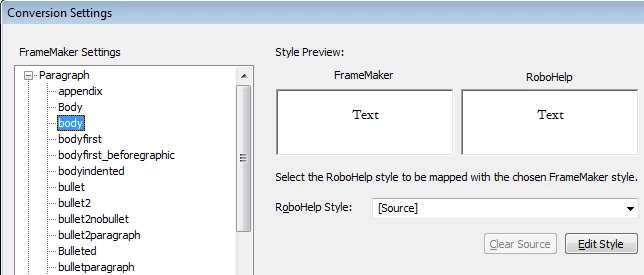
The most serious problem I've found (so far) is that I have 'body' text mysteriously turning to white font on white background on import-- even though the '[Source]' mapping style has no such specification-- so the resulting HTML is wrong. Here's what the import settings for the Paragraph style look like in my project:
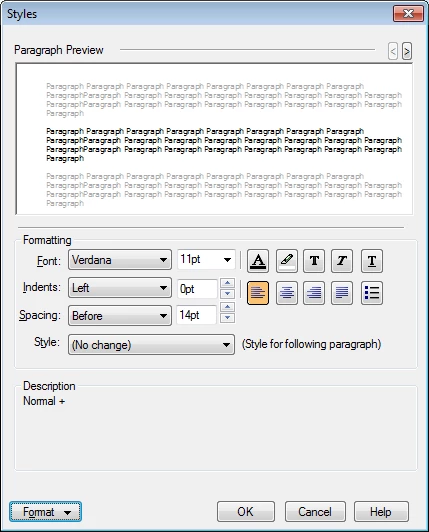
I click the "Edit Style" button, and here's the Styles dialog box settings (note that clicking Format button shows the text is black):
However, here's the result; white text on white background (I've highlighted some of the text so that you can see it in the picture below).

So,... any idea why/how this is happening and how to prevent it?

Thanks,

Kim

p.s.: Has anyone been able to actually successfully pull in FrameMaker source files into RH and then generate a CHM that looks good? If so, any helpful pointers to the Help, Blogs, forum posts here, etc. would be much appreciated. After a week of battling with Adobe TCS 3, I'm beginning to think this whole process is not ready for prime time... (and, given that my trial expires in 4 days, maybe I won't be buying TCS 3 to replace our FM6 to Web Works 7 to CHM application flow... ).

This topic has been closed for replies.

1 reply

Jeff_Coatsworth
Community Expert
Community Expert
August 22, 2011

Terminology clarification: If you're importing, it's a one-time thing to suck content from FM into RH. With linking, you can change content in FM and have those changes reflected in your RH project when you tell it to update.

I do the import process because my FM docs are in a more complicated format (a book of books) than RH likes to link to. I create WebHelp (rather than CHM) because it was felt that CHMs really look dated.

The issue of your FM body paragraph format not converting is controlled by the css sheet that you selected on the first page of the import. Check inside it to see how "body" is treated. BTW - why do you have a "Body" and "body" paragraph format?

Known Participant
August 22, 2011

Hi Jeff,

Thanks for the answer; I know the CSS should control it. In answer to your questions:

I'm linking (I tried Import at first, but since I was planning on editing the source in FrameMaker, I discovered linking). I run an "update all" to ensure source is refreshed from FrameMaker (even though I haven't edited my FM source to do anything but ensure my FM7 files were opened/saved with FM10). I used 'import' in parenthesis in my original post because it really still is importing source from FM to RH; it simply happens to be a new import each time I update (or at least I assume that's how it works ).

The 'body' style in the CSS has a color of 0 (black); here's what I assume are the 2 relevant settings (bold emphasis is mine, of course):

body { font-family: Verdana, Arial, Helvetica, sans-serif; font-size: 11pt; font-style: normal; font-weight: normal; color: #000000; background-color: #FFFFFF; letter-spacing: normal; text-align: left; text-indent: normal; word-spacing: normal}

.body { font-size: 10pt; font-style: normal; font-weight: normal}

It doesn't seem to matter if I use my own CSS, the 'default.css' choice, or even the RHStyleMapping.css. I still get white text in the resulting HTML after the update (import from linked FM files).

What's maybe telling is when I edit my css in RH with Notepad; I end up with entries like this at the bottom:

p.FM_body {
}

I think the link/update (the process of linking to and then update-importing the source) may be creating "FM_<stylname>" entries, though I haven't dug into this too deeply yet... (I'm about ready to delete the whole project and start over from scratch, in case the fact that I imported first before re-doing as linking has something to do w/this... though I don't remember if I started a new project when I setup the link. :-})

I simply have 1 book that is a collection of .fm files; no book-of-books for me (so I hope the link can work OK ).

As for your BTW question on why I have 2 body styles: I don't know; I inherited the FrameMaker source from my predecessors, and have been more focused on fixing the content of our Help than on fixing the 'interesting' ways in which the source has been formatted and edited by multiple authors over the years.

Kim

p.s.: I was hoping that since FM and RH are both Adobe products (and have been for awhile now), they would have figured out a way to pull the formatting/styles from FM into RH (without me needing to create a custom .fm template, edit a CSS, etc.), and have it look basically the same in RH as it does in FM. In other words, if FM specifies the formatting for each bit of text, why can't RH simply use that formatting (at least as far as font family, color, and other basics go)?

Jeff_Coatsworth
Community Expert
Community Expert
August 22, 2011

Yes, the CSS controls it all - see this blog post about the process (http://blogs.adobe.com/rjacquez/2009/05/linking_framemaker_9_books_in.html)

You can have RH apply 1 CSS to all your topics when you generate help - that's what I do, since it's easier than changing all the individual CSS's associated with each topic.