Known Participant
March 11, 2010
Question

PDF

  • March 11, 2010
  • 1 reply
  • 367 views

In the ToC of the PDF I can see "Dienstnehmer" and “Dienstnehmer” is a headline in the PDF (I want it like this). But I don´t want that there is a whole empty page under the headline "Dienstnehmer" - Is this because I said in the options that I want that each topic to begin on a new page? (I don´t want to change this. Every topic should begin on a new page, but not every book)
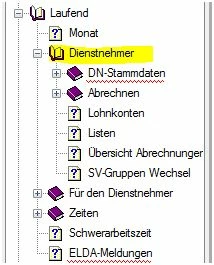
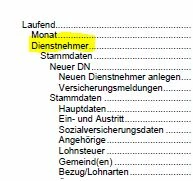
As always I hope you understand what I mean and I hope you can help me

Kind regards

Message was edited by: Peter Grainge to amend "site" to "page"

This topic is closed to new replies. Start a new post to keep the conversation going.

1 reply

Peter Grainge
Community Expert
Community Expert
March 11, 2010

It is not always possible to generate a PDF direct from RoboHelp, sometimes a little processing is required.

If a book is followed immediately by a topic, that topic will appear on the same page as the book title, you will get the book title followed by the topic title immediately below. I think what you are seeing is because Dienstnehmer is a book title followed by another book.

You could try different combinations of these settings but I think what you will need to do is create a Word document, remove the page break and then generate. Otherwise insert a topic after Dienstnehmerif that is practical.

Changing the settings affects headers and footers so check they are working as you want.


See www.grainge.org for RoboHelp and Authoring tips

@petergrainge

Use the menu (bottom right) to mark the Best Answer or Highlight particularly useful replies. Found the answer elsewhere? Share it here.