
April Bosworth
Inspiring
June 25, 2024
Answered

PDF - different sized pages?

  • June 25, 2024
  • 1 reply
  • 237 views

I have resized all of my PDF Page Layout Templates to be 5.5" x 8.5." I have one page that insists on being bigger (I'm guessing 8.5"x11" although I am looking at everything digitally, so not totally sure.)

The page is a copyright page contained within the PDF TOC "front matter" section and appearing before the TOC. 

Anyone have any ideas on how to get it to be the smaller size? I can't figure out which of the PDF template layouts is being used. I have defined:

  • Default page lyout
  • Chapters & Topics
  • TOC
  • Cover Page


I have not chosen/defined a page layout for List of Figures, List of Tables, Index or Glossary as my manual has none.

I have tried publishing it with and without the Empty Page template defined and it doesn't seem to make any difference. 

This is what my PDF TOC looks like
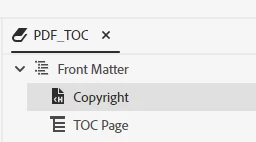
I am guessing that the problem is that the "front matter: other page" that I used to get the Copyright page in the front matter is "undefined." But I can't figure out how to define it.  

    This topic has been closed for replies.
    Correct answer April Bosworth

    @Peter Grainge Your Robohelp gems #67 solved the problem! We added did as AthensSlim suggested and added  

    "to the CSS used by the topic.

    @page {
      size: 8.5in 11in;
    }"

    Thank you!

    1 reply

    Peter Grainge
    Community Expert
    Community Expert
    June 26, 2024

    Essentially it is printing to US letter size rather than half letter size. I am  wondering if the larger size is A4 rather than letter size.


    Some while back there was a forum post about Save As PDF printing to A4 rather than US Letter size. I realise that's not the same as the PDF output but maybe the solution will help. Take a look at Item 67 in RoboHelp Gems on my site. Try adding that to layout.css but with your sizes. This is a complete guess.


    Also check the Common page layout settings. 


    Beyond that and the preset settings, I suggest for this one you need to go to Adobe Support. See https://helpx.adobe.com/contact/enterprise-support.other.html#robohelp for your Adobe Support options. The email link tcssup@adobe.com is recommended as it reaches a team dedicated to Technical Communication Suite products including RoboHelp.


    Let us know the outcome to help anyone else having this issue.

    ________________________________________________________

    My site www.grainge.org includes many free Authoring and RoboHelp resources that may be of help.


    Use menu (bottom right) to mark as Best Answer or to Highlight particularly useful replies. Found the answer elsewhere? Share it here.
    April Bosworth
    April BosworthAuthorCorrect answer
    Inspiring
    June 26, 2024

    @Peter Grainge Your Robohelp gems #67 solved the problem! We added did as AthensSlim suggested and added  

    "to the CSS used by the topic.

    @page {
      size: 8.5in 11in;
    }"

    Thank you!