



Mark_Noc
Inspiring
February 10, 2021
Answered

PDF Output Failed. How to debug? (Robohelp 2020)

  • February 10, 2021
  • 8 replies
  • 632 views

Hello all! I find it impossible to build my current project to PDF and I'd like some tips on how to debug the issue... I jave JAVA installed, and building the RoboHelp sample project to PDF works fine. However my current project does not work fine, and I'm not sure why not. Note that I have created a unique ToC for it, as a "book" and with front-matter, so from what I've read it should build fine... I have checked the output log generated by RoboHelp for any information too, but it is zero help (screenshot below anyway, just in case):
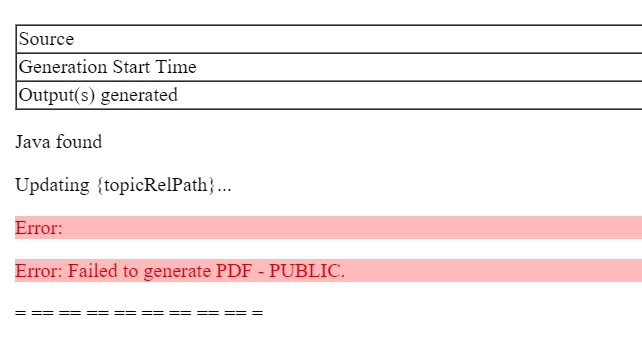
This document was originally designed as web only, so was started with the Frameless output, and then later PDF/CHM were requested... CHM and web build fine. 


My only recourse seems to be to make a copy of the project and start removing pages to find out which one (or ones) are causing the issue, but that seems like a rather painful and laborious task, so I'm hoping someone here can give me pointers on potential causes, as well as tips on debugging.

This topic has been closed for replies.
Correct answer Mark_Noc

Just to update this topic... Adobe have confirmed a bug in the PDF export that was causing it to get stuck on the "Transforming Into PDF Pages" section. I don't know what exactly the bug is as the reply from them simply said it was a bug and would be fixed in Update 5. 

8 replies

Legend
May 6, 2021

I have had several issues with PDF output myself, so here is what I could find out so far:

- sometimes, special characters like % or the like in subheaders caused issues

- sometimes, using the setting: Layout - TOC structure - Use topic heading styles did not work while the setting Chaper names and topic titles did work


Maybe playing around with these settings helps.

Best regards

Karin

Mark_Noc
Mark_NocAuthorCorrect answer
Inspiring
April 29, 2021

Just to update this topic... Adobe have confirmed a bug in the PDF export that was causing it to get stuck on the "Transforming Into PDF Pages" section. I don't know what exactly the bug is as the reply from them simply said it was a bug and would be fixed in Update 5. 

Peter Grainge
Community Expert
Community Expert
February 11, 2021

I removed say ten topics at a time until it generated, it took several hours. Then I knew the problem was the last ten so I put everything else back in to confirm it then generated. After that it was one topic at a time until I found the rogue topic.

________________________________________________________
See www.grainge.org for free Authoring and RoboHelp Information

Use the menu (bottom right) to mark the Best Answer or Highlight particularly useful replies. Found the answer elsewhere? Share it here.
Mark_Noc
Mark_NocAuthor
Inspiring
February 11, 2021

Okay, thanks Peter. I'll just bite the bullet and get on with it then! I'll update the topic if I find anything concrete that's causing the issue...

Peter Grainge
Community Expert
Community Expert
February 11, 2021

I recently dealt with a similar issue and when the second half failed, I had to remove a few topics at a time. Eventually I found removing just one topic allowed the PDF to build. The worst bit is there was no obvious reason but the person concerned rebuilt that topic and it was fine.


There is no quick way, sorry.

________________________________________________________
See www.grainge.org for free Authoring and RoboHelp Information

Use the menu (bottom right) to mark the Best Answer or Highlight particularly useful replies. Found the answer elsewhere? Share it here.
Mark_Noc
Mark_NocAuthor
Inspiring
February 11, 2021

So, to update... The current ToC has 6 "Chapters" with multiple sub-chapters within. I removed the first 3 and the last 3 and tried to build both. The one that has the first 3 chapters builds to PDF, the one with the last 3 gets stuck on "Transforming Into PDF pages", which is an improvement over the "Just won't build" of before. However, I can't narrow it down any further... I've tried building with different configrations of chapters from the last half of the document, and no matter what, if anything from the last three chapters is included the build process gets stuck on "Transforming Into PDF Pages". I've even left builds running overnight to see if it was just a question of time and after 14 hours, they still haven't built and are still "transforming"... So I'm back to square one of trying to find a way to properly debug PDF ouput or get suggestions on what could be causing this stall when transforming pages... 😞

Mark_Noc
Mark_NocAuthor
Inspiring
February 10, 2021

Hello Peter! Thanks for the reply... Okay, so the CSS isn't the issue as I get the problem whether I'm using the default CSS (copied from a blank project, as I'd edited the default CSS of this project), or not. 


As for the duplicate ToC suggestion, that sounds like a good plan, actually! Binary partioning to find the error... I'll go through that process now and see how I get on. Seems an obvious way to approach things, and I can't believe it didn't occur to me! Thanks!

Peter Grainge
Community Expert
Community Expert
February 10, 2021

The first thing to try is generate the About RoboHelp sample project. If that generates OK we know the issue is with your project.


Create a copy of your project to try the following.


1] Go to the Topic List Report and select all topics. Right click and select Properties and deselect your CSS. Apply the default.css. If you have been using that, grab a copy from a new project and copy that in with a different name. Apply that CSS. That will rule out a CSS issue.


2] Then it is a divide and conquer approach but it is easier in the new UI. Create two copies of the TOC and delete different halves. Do either then generate?

________________________________________________________
See www.grainge.org for free Authoring and RoboHelp Information

Use the menu (bottom right) to mark the Best Answer or Highlight particularly useful replies. Found the answer elsewhere? Share it here.