Known Participant
November 15, 2023
Answered

PDF output: Missing SVGs and missing formats

  • November 15, 2023
  • 11 replies
  • 2129 views

Hello everyone,

I'm on RH 2022.3.93 and am working on our PDF output.

I think my two issues might be related, so I'm posting them together:

The manual I am creating is about 150 pages long.


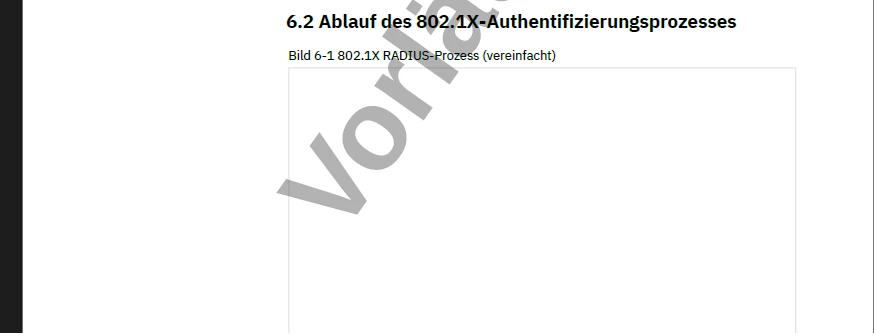
1. It contains a lot of screenshots (png) - they appear fine. It also contains a bunch of svg files. While some of them appear correctly, others (especially towards the end of the document) are simply missing. Within RH, they are displayed correctly.

  <figure>
    <figcaption>802.1X RADIUS-Prozess (vereinfacht)</figcaption>
    <img class="framed-screenshot_125mm" src="../../../assets/images/Zeichnungen/WLAN/00108491_RADIUS-Prozess.svg" />
  </figure>
 

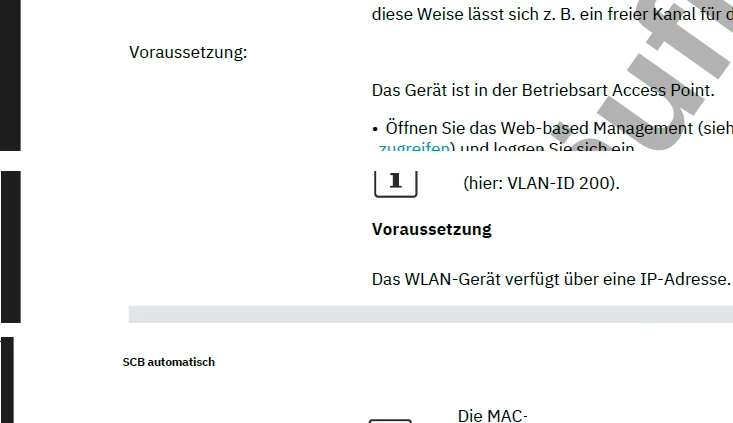
2. I have created a <h5> style. No class, just h5. It is supposed to be bold, font-size 9 and margin-left is 45mm. Within the document, I get different results for my code: 

No further styles, just this code:

In one case, it is displayed correctly (bold, with margin-left).

<h5>Voraussetzung</h5>

In most other cases, it is neither bold nor does it have a margin-left.

<h5>Voraussetzung:</h5>

In some cases, it is displayed bold but font-size 6.

<h5>SCB automatisch</h5>
 

A similar error occurs with my style h6.Margintext. It is supposed to be bold, font-size 9.

Some occurrences: bold and font-size 9.

<h6 class="Margintext">Pop-up-Fenster: DHCP Static Leases</h6>

Some occurrences: not bold

<h6 class="Margintext">Verschlüsselung: WPA2-EAP und FT-EAP</h6>

Again, within RH, everything is displayed correctly.

 

My colleague can reproduce these errors - she is missing the exact same svg files and the exact same formatting.


Any ideas on how to fix this?

Cheers

Carolin

    This topic has been closed for replies.
    Correct answer Peter Grainge

    I have been working offline with @Carolin123 and found the issues behind the problem.


    First of all, in the CSS some of the styles were grouped. That is perfectly valid CSS but RoboHelp doesn't seem to like it. The styles show if the CSS is opened but they don't show in the Styles pod making the application of styles difficult. I think it had some effect when generating an output but would need some more testing to be sure.


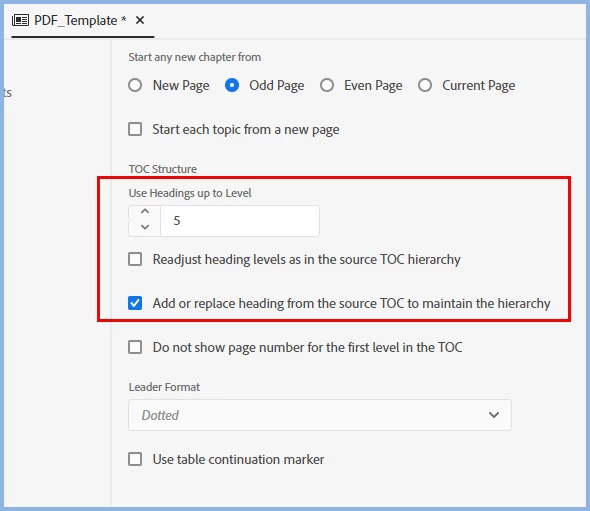
    The root cause was the settings in the template combined with the use of heading styles rather than paragraph styles for the margintext. By using the two checkboxes shown and ungrouping the styles, the correct style was shown. Although I changed the number of heading styles for the TOC shown below, that was not necessary to get the style correct in the body.


    The solution above avoids breaking the list and the attendant need to keep restarting the numbering that could be required. It also means the styles applied in the topics do not need to be changed as in the following solution.


    Before finding the above solution, I had come up with a workaround. Simply change h5 to p.margintext. Then it is no longer a heading and does not get affected by the checkboxes. However, it breaks the list so it might be necessary to keep restarting the numbering. That would mean going through every topic that uses h5 and changing the style to p.margintext. For that reason I think the first solution is the easiest to use.

    ________________________________________________________

    My site www.grainge.org includes many free Authoring and RoboHelp resources that may be of help.


    11 replies

    Jeff_Coatsworth
    Community Expert
    Community Expert
    November 15, 2023

    For #1 - do the images all appear if you create some other output like Responsive HTML5 as a test? If so, then I would suspect something is failing in the PDF generation. If not, then it's got to be something to do with the images or their location. Are you getting any warnings during generation?

    For #2 - I'm unclear as to where this is not working - in the RH project and the PDF output or just in the output? If in both, I would say that you haven't defined the styles in the css correctly (or that a css is being applied that doesn't contain their definitions).

    Known Participant
    November 15, 2023

    Hi Jeff,

    #1: In HTML output, all images appear. I figured there might be something wrong with the PDF generation, but I don't know what it could be. Too many svg files for RH to handle?


    #2: In the RH project, everything looks fine. In HTML output as well. Only PDF output produces different results in different parts of the text (reproducable, though). There is only one css file applied (layout.css). This can't be the problem, though, can it? As I said, in some cases it displays correctly, in others, it is partially correct, in others, it is simply not layouted at all and just gets the body properties (at least that's what I presume happens).


    As I said, I think the two issues are connected and my guess would be that this has to do with the PDF generation - and I also think this might be some RH internal error, as my colleague can reproduce it on her computer.

    Known Participant
    November 15, 2023

    ... just for the record, it is not THAT many svg files. I'd guess it is around 15 svg files in total on the 150 pages of PDF.