
Inspiring
October 30, 2014
Answered

Please assist with image style question....

  • October 30, 2014
  • 1 reply
  • 473 views

Experts:

1. I have defined an image style which looks like this in the image style editor:
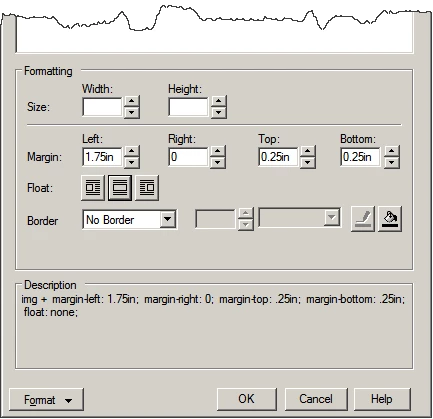
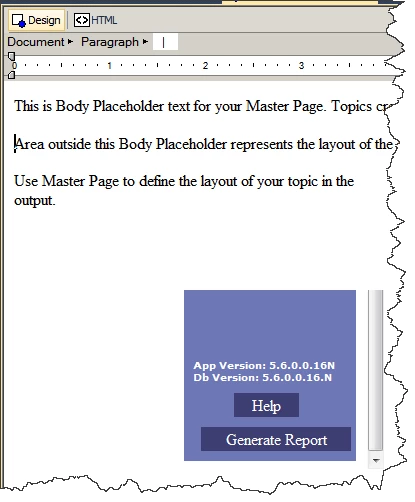
2. I applied the style to an image. As expected, in the WSIWYG editor, the image is intented 1.75in":
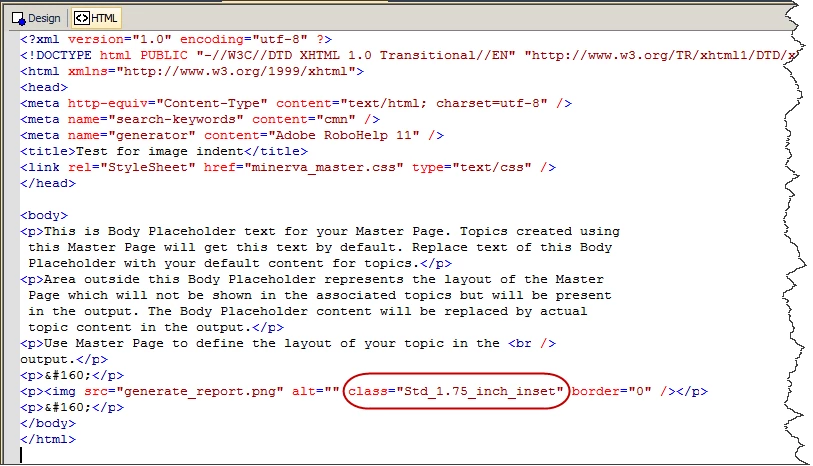
The code (for this simple page, which happens to be a master page, but I find the issue on regular pages too) looks like this:
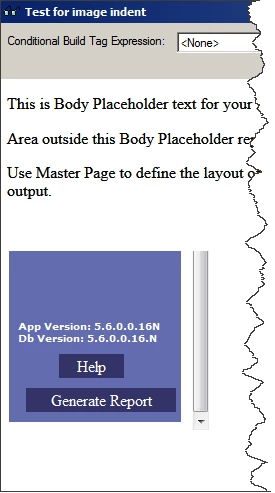
3. HOWEVER, in preview mode, and in the WebHelp output, the graphic is flat against the right edge:
Is something being overwritten somewhere? Or, perhaps I don't understand what a "class" is?

Thanks!

Kurt

This topic has been closed for replies.
Correct answer Captiv8r

HI Kurt

I could be wrong here, but what you shared shows the image "smooshed against" the LEFT side not the right.

I'm wondering if the issue here is your naming of the style. I note there seems to be a period in it. You might try again and ensure the style name doesn't contain a period. I'm thinking that may be confusing things.

Cheers... Rick

1 reply

Captiv8r
Captiv8rCorrect answer
Legend
October 30, 2014

HI Kurt

I could be wrong here, but what you shared shows the image "smooshed against" the LEFT side not the right.

I'm wondering if the issue here is your naming of the style. I note there seems to be a period in it. You might try again and ensure the style name doesn't contain a period. I'm thinking that may be confusing things.

Cheers... Rick

kdeulerAuthor
Inspiring
October 30, 2014

Rick-

  1. Yes, thank you. I meant "left" side.
  2. You were spot-on! The period was indeed the problem. Of course, I re-discovered an issue I found long ago: When the user Renames a style, the style is removed from all entities that it was formerly applied to, without warning (and, I believe, without undo). Luckily, I was only doing a test.

Thanks again!

-Kurt