
Participant
June 3, 2016
Question

Printed Documentation Function Cannot Find Microsoft Word

  • June 3, 2016
  • 1 reply
  • 447 views

Using:

  • Parallels Desktop 11 for Mac
  • RoboHelp 2015
  • Word 2016

Issue:

While running RoboHTML on Parallels, attempting to use the Printed Documentation function.

Steps:

  1. Open project in RoboHTML.
  2. In the Output (SSL) pod, click Printed Documentation. The following message appears:
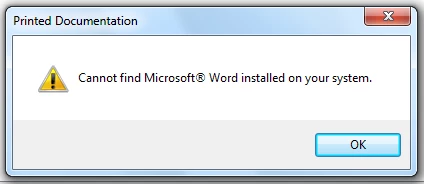
Notes:

I have already re-installed Word, applied RoboHelp upgrades, and restarted system.

Any advice on how to resolve this issue?

Thanks in advance for your assistance.

This topic has been closed for replies.

1 reply

Peter Grainge
Community Expert
Community Expert
June 3, 2016

You have to have opened Word, not sure if that also has to be before you installed RoboHelp. It's not clear from your post and it could be that you just installed both.


See www.grainge.org for RoboHelp and Authoring information

@petergrainge

Use the menu (bottom right) to mark the Best Answer or Highlight particularly useful replies. Found the answer elsewhere? Share it here.
Wha-King_Mac_Guru
Participant
June 3, 2016

Thanks @petergrainge I'm working on the system above.  Either way it fails with the same error.  I've reloaded both Office and RoboHelp. Same error.  Logged in as a fresh user. Still the same error.  Added Word to the File Associations list.  Not luck.

Peter Grainge
Community Expert
Community Expert
June 4, 2016

Do you mean File Associations within Windows? If you do, then something is wrong as that should not be necessary.

Also you say you have reloaded Word and RoboHelp but not confirmed that you ran Word before installing RoboHelp. It might also be worth uninstalling both using something like Wise 365 or C Cleaner to remove stuff both programs leave behind with their uninstall routines.

If then you still have the problem, I will reach out to someone who I believe has a similar configuration to you.


See www.grainge.org for RoboHelp and Authoring information

@petergrainge

Use the menu (bottom right) to mark the Best Answer or Highlight particularly useful replies. Found the answer elsewhere? Share it here.