
Inspiring
March 11, 2026
Question

Printed Documentation will not generate a .docx document

  • March 11, 2026
  • 1 reply
  • 36 views

This problem popped up out of nowhere; all I did was update a screenshot. Now, every time I try to generate Printed Documentation, I get this:
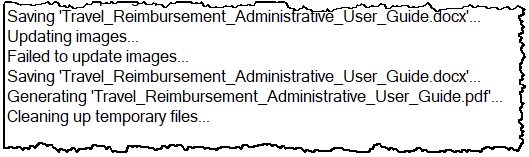
Do I need to update my updated screenshot?


Thanks for any help anyone can offer

Lon

    1 reply

    Peter Grainge
    Community Expert
    Community Expert
    March 11, 2026

    It worked before you changed the image, the screenshot is saying generation has failed to update the images. I could be wrong but my guess is the changed image is the issue.

    Remove it and generate again and generate to a new location.


    My site www.grainge.org includes many free Authoring and RoboHelp resources that may be of help.

    Use the menu (bottom right) to mark the Best Answer or Highlight particularly useful replies. Found the answer elsewhere? Share it here.
    Inspiring
    March 12, 2026

    Hi, Peter!

    I tried your suggestion, and it worked! Then it didn’t…

    1. I removed the most recent screenshots (2)
    2. published them at a different location.
    3. Yippee!
    4. so i tried putting them back in, one at a time to see if one or the other was the culprit.
    5. same error message for each.
    6. removed both again, re-published
    7. Now getting the error message without screenshots

    curiouser and curiouser...

    Peter Grainge
    Community Expert
    Community Expert
    March 13, 2026

    @LonTheWriter Word and PDF are different presets. One cannot generate the other. 

    ________________________________________________________ 

    My site www.grainge.org includes many free Authoring and RoboHelp resources that may be of help. 

    Use the menu (bottom right) to mark the Best Answer or Highlight particularly useful replies. Found the answer elsewhere? Share it here.