
October 17, 2014
Answered

Printing responsive layouts in Internet Explorer

  • October 17, 2014
  • 2 replies
  • 1412 views

When printing a responsive layout from RoboHelp 11.0.3 in Internet Explorer 11 the PDF just shows the title, first line or two and scroll bars, see image. The pages print normally from both Chrome and Firefox.  We have checked and this seems to occur with a brand new project straight out of the box.
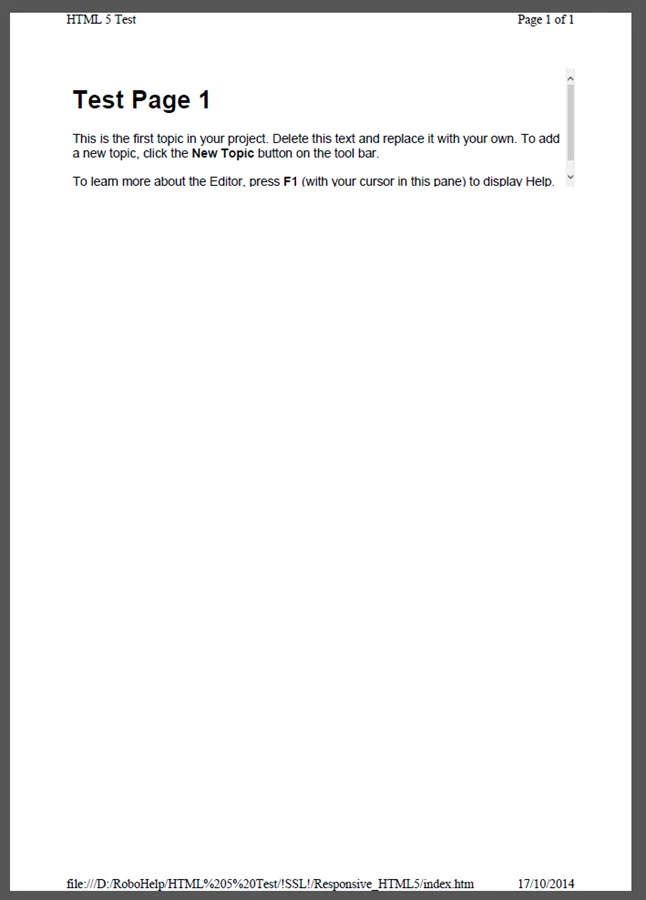
Any ideas how to get round this would be great appreciated.

This topic has been closed for replies.
Correct answer Peter Grainge

I see the same plus the content is not the full content on the page. Making enquiries.


See www.grainge.org for RoboHelp and Authoring tips

@petergrainge


The likely cause has been identified but only Adobe can fix it. They have been alerted but meantime you should submit a bug report.

Please follow this link.

http://www.Adobe.com/cfusion/mmform/index.cfm?name=wishform&product=38


See www.grainge.org for RoboHelp and Authoring tips

@petergrainge

2 replies

Known Participant
December 29, 2014

I've noticed the same issue after patching to version 11.03. I'm using Internet Explorer 10. I've tried several different ways to print, and I've noticed the following:

  • Click the print button. Printout is cut off.
  • Press control-p. Prints fine.
  • Right-click and select print. Prints fine
  • Right-click and select print preview. Printout is cut off.
Peter Grainge
Community Expert
Community Expert
January 2, 2015

Click the link below to see the update at the end of the Announcement re the 11.0.3 patch. There is a link to a fix for this problem.

RoboHelp


See www.grainge.org for RoboHelp and Authoring tips

@petergrainge

Use the menu (bottom right) to mark the Best Answer or Highlight particularly useful replies. Found the answer elsewhere? Share it here.
Peter Grainge
Community Expert
Community Expert
October 17, 2014

Exactly what steps are you taking to print?

If you print to a physical printer rather than sending to PDF, does the scroll bar still appear?

What PDF program are you using?


See www.grainge.org for RoboHelp and Authoring tips

@petergrainge

Use the menu (bottom right) to mark the Best Answer or Highlight particularly useful replies. Found the answer elsewhere? Share it here.
October 20, 2014

Hi Peter,

I get the same result when sending it to a physical printer, scroll bars and all. The PDF print was produced by selecting Adobe PDF from the printer list, even the "File" --> "Print Preview" before selecting the printer shows the same result.

Steps to Print:

Click on the Printer Icon in the Desktop Function Holder Bar.

Select printer or Adobe PDF

Click Print

Also tried:

Click "File" in the browser header bar

Click "Print..."

Select printer or Adobe PDF

Click Print

Printing fails this way on all three layouts, phone tablet and desktop.

Thanks,

Tom.

Peter Grainge
Community Expert
Community Expert
October 20, 2014

I see the same plus the content is not the full content on the page. Making enquiries.


See www.grainge.org for RoboHelp and Authoring tips

@petergrainge

Use the menu (bottom right) to mark the Best Answer or Highlight particularly useful replies. Found the answer elsewhere? Share it here.