


meganb15495770
Participant
Feb 13, 2018 9:43 PM UTC
Answered

Problem generating project as HTML5--Robohelp 2017

Hello!

I am brand new to Robohelp, and I'm working with Robohelp 2017 13.0.2.334.

I would like to generate my project in Responsive HTML5, but when I try to do so, I get this message:
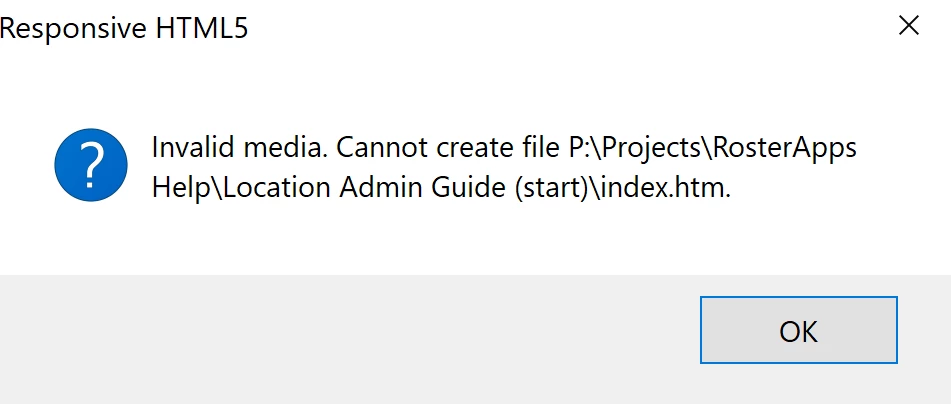
Does anyone know why I might be getting this message, and how to fix it? My project generates in Webhelp just fine.

Any help is much appreciated!

Thanks,

Megan

This topic is closed to new replies. Start a new post to keep the conversation going.
Peter Grainge
Peter GraingeCorrect answer
Community Expert
Feb 13, 2018 10:38 PM UTC

You should generate to the same drive as the project, normally the C drive. If the project is on the P drive, move it to the C drive first and try again.

To put the output on a web server, you use the publish feature. See the first two sections in Publishing WebHelp for more information about the difference between generating and publishing.

Let us know whether or not that fixes the problem.


See www.grainge.org for free RoboHelp and Authoring information.

@petergrainge

Use the menu (bottom right) to mark the Best Answer or Highlight particularly useful replies. Found the answer elsewhere? Share it here.

2 replies

Peter Grainge
Community Expert
Peter GraingeCommunity ExpertCorrect answer
Community Expert
Feb 13, 2018 10:38 PM UTC

You should generate to the same drive as the project, normally the C drive. If the project is on the P drive, move it to the C drive first and try again.

To put the output on a web server, you use the publish feature. See the first two sections in Publishing WebHelp for more information about the difference between generating and publishing.

Let us know whether or not that fixes the problem.


See www.grainge.org for free RoboHelp and Authoring information.

@petergrainge

Translate
Use the menu (bottom right) to mark the Best Answer or Highlight particularly useful replies. Found the answer elsewhere? Share it here.
meganb15495770
Participant
Feb 14, 2018 7:36 PM UTC

Thanks, Peter! That was the issue. The project was on the C drive, but for some reason was trying to generate to the P drive. I changed it to generate in the C drive and now it works.

Thanks so much!

Megan

Translate