
Inspiring
Aug 14, 2012 2:53 PM UTC
Question

Problem setting Home URL

I inherited a project whose output is WebHelp Pro.

When the user clicks Home, the 404 error message appears -- File or directory not found.

I opened the Window Properties (WebHelp Pro) dialog box to check the URL, but could not find any field to check the Home URL.
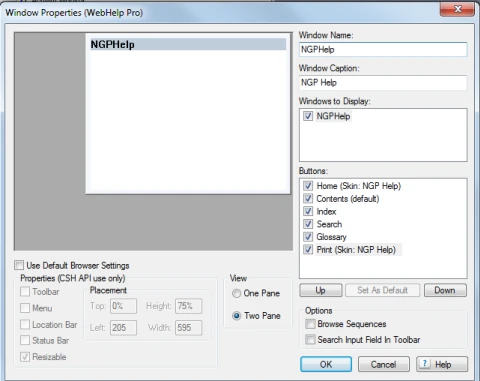
I looked in the Help, which says that "In WebHelp Pro, you can view settings after the project is published to the server." Does this mean that there is no way for me to specify the desired URL in the project?

If that is the case, do I need to generate straight WebHelp instead of WebHelp Pro? I think the previous writer generated WebHelp Pro output because the company was thinking about providing server-based Help.

I was hoping that the "Advanced window Destinations properties" applied to WebHelp Pro because it enables you to define the URL to display when clicking Home. Bit I think it only applies to HTML Help .

Thanks for any help.

Carol

How do I set advanced properties for a WebHelp pro window? The Home button displays an error and I can't see any place to fix it. This is RoboHelp 9.

    This topic is closed to new replies. Start a new post to keep the conversation going.

    7 replies

    RoboColum_n_
    Legend
    Aug 14, 2012 3:27 PM UTC

    WebHelp Pro output is only required if you have the Adobe RoboHelp Server application. Note that this is not part of Adobe RoboHelp. It is a common misconception that to host output on a server that you need Adobe RoboHelp Server. You don't. You just need to generate plain WebHelp output and publish to the server. I have covered all this in detail on my blog:

    http://www.cmcandrew.com/robocolumn/archives/275

    With WebHelp Pro output, the URL you use is located on a server but is defined by the setup of the Adobe RoboHelp Server application and the project published to it. Hopefully this information will help you decide what output you need to generate. When you know, come back and we can help further.

    Translate
    Inspiring
    Aug 14, 2012 7:28 PM UTC

    Thanks very much for your reply. After I looked at your blog, I realized that I'd been to your site before, when I was trying to figure out how to clean out unwanted RoboHelp files .

    The previous writer thought that he was going to implement Adobe RoboHelp Server (an initiative that did not move ahead) and so created WebHelp Pro outputs. I've never changed to WebHelp output because it did not appear that it was necessary. We are not publishing to a server. I just wanted to know how to get the Home icon to open to a valid location when the user clicks it.

    After a bit of rooting around, I discovered that the previous writer specified the action to take in WebHelp Skin Editor > Custom Toolbar Item > Action > Link. (The old entry pointed to a non-existent file.)

    Now I can get the Home icon to open the Introduction.htm topic by browsing to my local path or by entering a network address.

    But we'll be deploying the Help to customer sites, where the path will not match what is currently specfied in the skin.

    Do you know how I should specify the path in the skin editor so that it opens Introduction.htm in one of the deployed release folders? I could not find any kind of configuration file in RoboHelp.

    Thanks again.

    Carol

    Translate
    Peter Grainge
    Community Expert
    Community Expert
    Aug 15, 2012 2:23 PM UTC

    When you add the button you will see an Action tab with a Link field. Browse to the required topic.


    See www.grainge.org for RoboHelp and Authoring tips

    @petergrainge

    Translate
    Use the menu (bottom right) to mark the Best Answer or Highlight particularly useful replies. Found the answer elsewhere? Share it here.