Inspiring
June 25, 2025
Answered

Problem With Framless' "In This Topic" Section on ONE Topic

  • June 25, 2025
  • 12 replies
  • 1761 views

Hello,


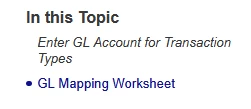
Normally, the "In This Topic" section of the Frameless output has links to the H1, H2, H3, and H4 styles, and links to them as such, without using bookmarks. See an example of the filepath/webpage URL that pops up for a normal topic when clicked in the "In This Topic" section.
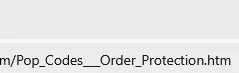



Now, see below an example of the page that is failing. I believe it is throwing Error 403 Forbiddens to our customers because it is using bookmarks (and incomplete ones, at that) to try and call the section of the page.


 

How do I fix this?

    Correct answer Zachary24897071nluu

    I don't see how it is demeaning. It is simply a statement of fact to establish it is something in your project that we haave to troubleshoot. 


    Does the file I sent work or not? If it does, then my troubleshooting was correct. 

    ________________________________________________________

    My site www.grainge.org includes many free Authoring and RoboHelp resources that may be of help.


    It is the italics and the link in the header that did this.


    Removing the italics from H2 and the outgoing link that was H2 solved the problem.


    Seems like it was a RH issue.

    12 replies

    Peter Grainge
    Community Expert
    Community Expert
    June 25, 2025

    If you import that topic into a new project, does it have the same issue?

    ________________________________________________________

    My site www.grainge.org includes many free Authoring and RoboHelp resources that may be of help.


    Use menu (bottom right) to mark as Best Answer or to Highlight particularly useful replies. Found the answer elsewhere? Share it here.
    Inspiring
    June 25, 2025

    Yes

    Peter Grainge
    Community Expert
    Community Expert
    June 25, 2025

    In This Topic uses headings within the topic. You are showing a path to another topic. Look in the code of the topic with the problem. That should show something wrong.

    ________________________________________________________

    My site www.grainge.org includes many free Authoring and RoboHelp resources that may be of help.


    Use menu (bottom right) to mark as Best Answer or to Highlight particularly useful replies. Found the answer elsewhere? Share it here.
    Inspiring
    June 25, 2025

    Peter,


    These two headers pictured ARE in this same topic, that's the problem. It is calling something incorrectly.


    Where would I even begin to look in the code? I don't even know where that is located in terms of filepaths on the machine.


    How do I prevent this sort of degradation? I haven't touched this topic in months. How did it manage this on its own?