
Inspiring
October 24, 2019
Question

Problem with output in Robohelp 2019 Reimagined

  • October 24, 2019
  • 5 replies
  • 362 views

Hi,

I am using Rh Reimagined and recently imported a new Word Document to my Contents. But half of the content in the folder turns out like this in my output:
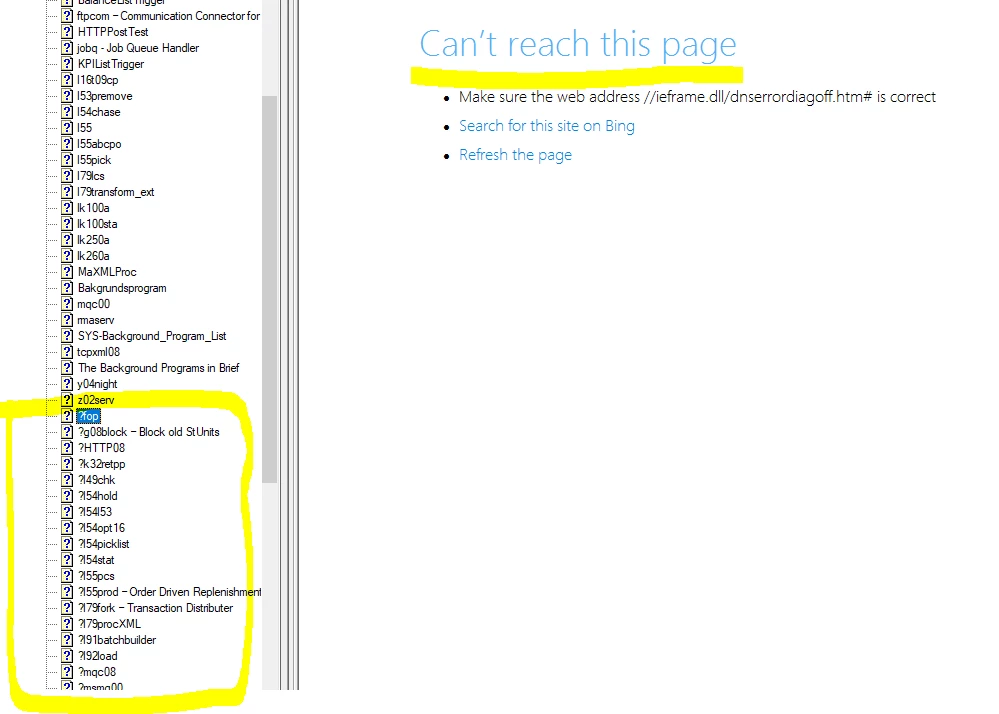
As you can see there's a questionmark in front of the topics that there's trouble with. Has anobody else run in to this problem and might know what's wrong?


Thanks,

K.

This topic has been closed for replies.

5 replies

Peter Grainge
Community Expert
Community Expert
October 25, 2019

RoboHelp Reimagined is the name of one of the sample projects. The product is RoboHelp 2019.


Please follow this link to report bugs or request features. https://tracker.adobe.com


www.grainge.org

Use the menu (bottom right) to mark the Best Answer or Highlight particularly useful replies. Found the answer elsewhere? Share it here.
kajsaros1Author
Inspiring
October 25, 2019

I have looked into it and it probably have something to do with the "page break" between the headings in the Word Document...but this has never been a problem in Rh Classic. There's a lot of work fixing those page breaks in the document and I hoped for an easier solution in Rh. Is this a kind of bug in the Rh Reimagined? since it works in Classic?

Peter Grainge
Community Expert
Community Expert
October 25, 2019

My guess would be those are headings in the Word document that are characters the import process is not handling. Look at a few of them to see what it is. Let us know.


www.grainge.org

Use the menu (bottom right) to mark the Best Answer or Highlight particularly useful replies. Found the answer elsewhere? Share it here.
kajsaros1Author
Inspiring
October 25, 2019

My settings looks as follows:

Jeff_Coatsworth
Community Expert
Community Expert
October 24, 2019

What were your pagination settings? (the Word Styles you chose to break up the Word doc into topics in RH)