
Inspiring
January 28, 2015
Question

Problems printing from a Responsive HTML5 layout persist

  • January 28, 2015
  • 1 reply
  • 821 views

Running 11.0.4.291.

It is my understanding that this update includes recent hotfixes, such as the fix for this issue:

The print output in Internet Explorer using the Responsive HTML5 print button does not print the entire contents of the output. Only a small section of the top of the output is printed.


That said, I am still seeing the bad behavior in my updated software. Any ideas why?
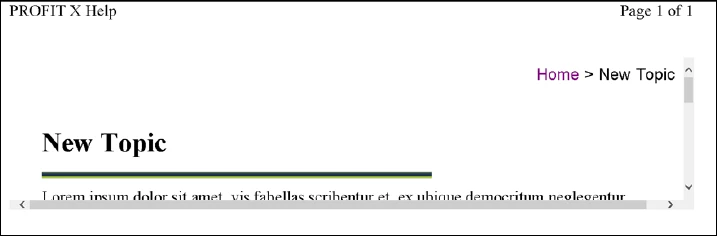


Additional observations:

  • In IE 10, print preview only shows a small section of the top of the topic. (As shown above.) Printing, however, does provide the whole topic.
  • In the latest versions of Chrome and Firefox, print preview AND printing only provide the very top portion of the topic.


A bug report has been submitted.


This topic has been closed for replies.

1 reply

Known Participant
February 6, 2015

Funny, I installed the hotfix and now my outputs print correctly. I am running RoboHelp 11.0.3.268 and using Internet Explorer 10. I have only installed the hotfix (not the 11.0.4 patch). Maybe you should try only installing the hotfix?

Inspiring
February 6, 2015

To clarify... Apparently the Responsive HTML 5 print button DOES work, thanks to the hotfix or 11.0.4 patch. However, my big issue is this--as far as I can tell, the Responsive HTML 5 print button is only shown when the responsive layout is displayed full screen, at a high resolution. (See How do I get the Function bar to appear in my responsive layout?)


For example, when I work on my laptop and have the resolution set to 1600 X 900, I can see it and use it to print. Most of the time, though, I’m working on my desktop, with monitors that only go to a resolution of 1280 X 1024, and then I don’t see the button. My only alternative then is to use the print options provided by the browser I'm using. But, when I do that, I run into the original problem where I only get a small section of the top of the topic to print. Also, on a tablet, connected to a wireless printer, I have no way to print, apart from the browser options. I don't think the status quo will be acceptable to my end users.


Unless I'm missing something, it seems like either the Responsive HTML 5 print button needs to be available at all resolutions or the Responsive HTML 5 layouts need to work with all browser print options.

Willam van Weelden
Inspiring
February 9, 2015

The layout is designed to only show this button on desktop. You can (a) change the break points (see referenced query) or (b) update the layout itself. The b option requires a redo of the entire design.