

Procedures with pictures/Multilevel list with bullets/numbers disappear in browser
Ok, Sorry if this has been covered. I have searched the internet and found none of the MLL problems matching my own.
My whole goal is to be able to create numbered procedures in Robohelp webhelp that has images such as what I created below. The problem is, I want images inserted with no numbering or bullets. I've found I can't do this because it breaks the numbered procedure, so what I have show here is don't manually (which I don't want to do considering my project has about 10,000 files.
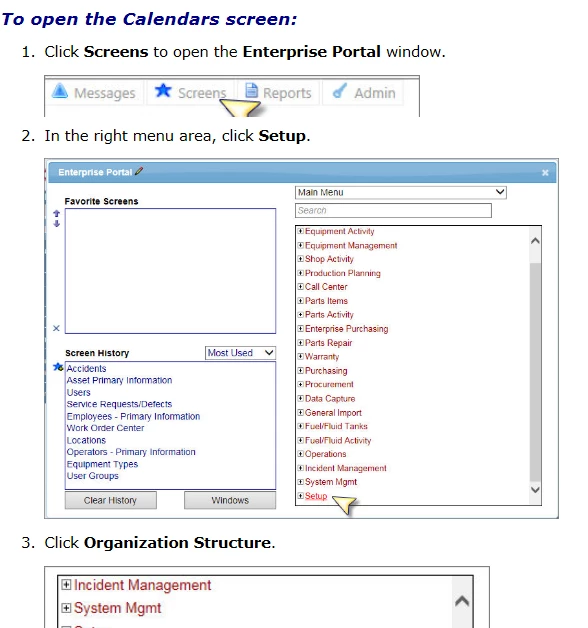
I created a multilevel list in Robohelp for procedures to help with this need. I set up this list that has a mixture of bullets/numbers, and nothing in front in order to have a procedure in a topic with images to go along with it (that of course don't break the numbering system, and aren't numbered themselves, because it looks a bit odd to just have a step numbered picture).
So, with each line being a new line and different indentation level, here is how the list looks in Robohelp (on the left) and then how it comes out in the browser (on the right). I have tried Chrome and IE and they come out the same.
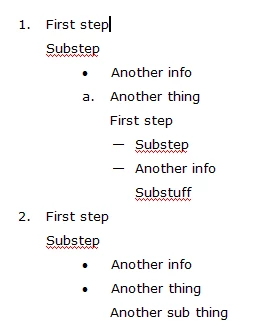
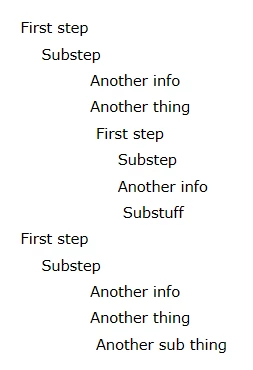
It does appear that the lists show up correctly in the generated CHM file, but I don't feel confident using these multilevel lists if they don't actually work when they use them in the browsers.
Does anyone know how to fix this list issue, OR, insert or do a copy paste in a new line between numbered procedures that don't break them so they have to be remembered every time?


 AdChoices