
Inspiring
February 25, 2023
Answered

Published ToC shows file names instead of titles

  • February 25, 2023
  • 2 replies
  • 612 views

Issue: In the published ToC, the file name appears instead of the title.

I am working in Rh version 2022.0.346 but have seen this issue happen in prior versions as well.

In the project file, the file name is showing instead of the title. If I open the properties and click Apply, the topic updates and shows the title instead of the file name.
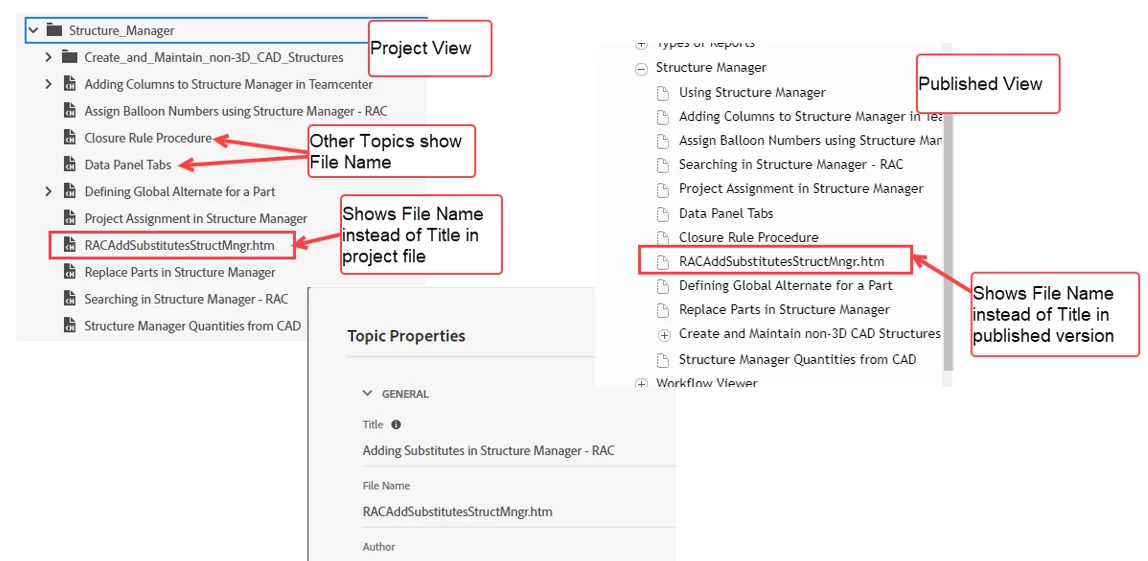
I have 755 topic pages in my project and publish an update once a month. It is time consuming to check every topic each time to ensure it is publishing correctly.

I have read RH-11277 and other postings in the Community like this one. I have not seen any issues with search returning file names instead of topic names.

Anyone have any suggestions?

    This topic has been closed for replies.
    Correct answer Amebr

    The only workaround I know is the one you are already aware of. Do vote on the bug item so hopefully it will be prioritised.


    You could also try contacting Adobe support directly, but I don't think you'll get a different answer at this stage. If you do want to try, the email address on the following page is recommended as it goes to a dedicated Robohelp team. 
    https://helpx.adobe.com/contact/enterprise-support.other.html#robohelp


    If they do give you an alternative solution, please post it here to help others. 🙂

    2 replies

    Inspiring
    September 28, 2023

    If it helps, I had this issue for one topic and it seemed to be fixed by adding our Master Page to the topic properties (accidentally missed).

    R McFAuthor
    Inspiring
    September 28, 2023

    @Dana26548320ehdw @Amebr 

    I have submitted RH-12112. would appreciate some votes to help get this fixed.

    Peter Grainge
    Community Expert
    Community Expert
    September 29, 2023

    Why not comment in your earlier bug report RH-11277 which claims it is fixed in 2022.3? Have you upgraded to that to try it?


    My experience is the filename showing in the Contents panel causes it to show in the TOC so it is the same bug.

    ________________________________________________________

    My site www.grainge.org includes many free Authoring and RoboHelp resources that may be of help.


    Use menu (bottom right) to mark as Best Answer or to Highlight particularly useful replies. Found the answer elsewhere? Share it here.
    AmebrCommunity ExpertCorrect answer
    Community Expert
    February 26, 2023

    The only workaround I know is the one you are already aware of. Do vote on the bug item so hopefully it will be prioritised.


    You could also try contacting Adobe support directly, but I don't think you'll get a different answer at this stage. If you do want to try, the email address on the following page is recommended as it goes to a dedicated Robohelp team. 
    https://helpx.adobe.com/contact/enterprise-support.other.html#robohelp


    If they do give you an alternative solution, please post it here to help others. 🙂