Known Participant
July 15, 2009
Answered

Publishing in WebHelp with RH 7

  • July 15, 2009
  • 1 reply
  • 1063 views

When I publish a RH 7 project in WebHelp, I get the following error message:
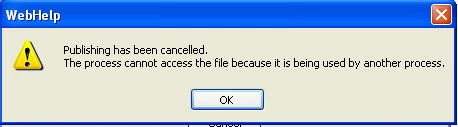
However, when I open the folder that Im publishing to, it seems as if the files are there.

No other files are open when this happens. And it doesn't happen when I publish to FlashHelp. Does anyone have any thoughts?

Thanks.

This topic has been closed for replies.
Correct answer Peter Grainge

Unfortunately, that didn't work.


Create a new location on your hard disk to which you can publish. Does that work?


See www.grainge.org for RoboHelp and Authoring tips

1 reply

RoboWizard
Inspiring
July 15, 2009

Hi there

Check both the source and destination folders for a file named Thumbs.db. This is a file that sometimes causes problems. It's created by Windows when you view the folder in Thumbnails view to see images.

Locating and removing that file may help.

Cheers... Rick

Helpful and Handy Links

elissagAuthor
Known Participant
July 15, 2009

No sign of that file in either source or destination folders. If only it could be that easy...

Peter Grainge
Community Expert
Community Expert
July 15, 2009

See Snippet 55 at http://www.grainge.org/pages/snippets/snippets.htm


See www.grainge.org for RoboHelp and Authoring tips

Use the menu (bottom right) to mark the Best Answer or Highlight particularly useful replies. Found the answer elsewhere? Share it here.