Known Participant
January 21, 2013
Answered

Publishing to RoboHElp Server 9 with RH 9 does not refresh the webhelp pro toolbar

  • January 21, 2013
  • 1 reply
  • 532 views


Hi,

We have an issue with publishing to RH9 Server from a RH9 project.


When we open the published file from this URL:

http://ntrobohlpd02:8080/Robohelp/server?prj=Tests_2_Entreprise_FR

The toolbar (where the TOC, index etc. icons are displayed) comes from another project:
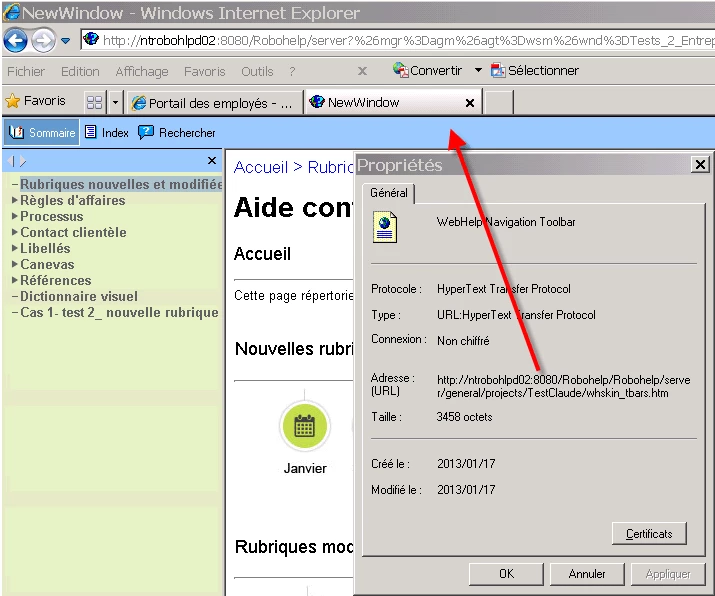


The toolbar that should display is this one (large green and grey icons):


Why does the server show the whkin_tbars.htm from another project?


Really weird.


We've tried to restart the server as mentionned by Adobe tech support when I contacted them. It worked once, but will we need to restart the server every time we want to publish?


Thanks


    This topic has been closed for replies.
    Correct answer RoboColum_n_

    Presumably the same does not happen if you view the help from the generated location. What happens if you launch the help from the server or from the Web Administrator?

    I always suggest that people manually delete all the files from the server area location before they publish their output. The publish process is unlike the generate process. It is effectively just a copy an leaves all sort of unnecessary files behind from the previous publish. By publishing to a "clean" location you know that the content is good.

    You may also want to delete your browser cache. This has been known to cause confusion by displaying a cached (and therefore old) file. Let us know how you get on.

    1 reply

    RoboColum_n_
    RoboColum_n_Correct answer
    Legend
    January 22, 2013

    Presumably the same does not happen if you view the help from the generated location. What happens if you launch the help from the server or from the Web Administrator?

    I always suggest that people manually delete all the files from the server area location before they publish their output. The publish process is unlike the generate process. It is effectively just a copy an leaves all sort of unnecessary files behind from the previous publish. By publishing to a "clean" location you know that the content is good.

    You may also want to delete your browser cache. This has been known to cause confusion by displaying a cached (and therefore old) file. Let us know how you get on.

    Mosens85Author
    Known Participant
    January 23, 2013

    Hi Colum,

    Thanks again for your input.

    Indeed, the generated content is correct as shown in the second picture. We have tried your suggestion to delete all files from the server and restart said server. This does the trick.