
jeanettew83275945
Participating Frequently
August 14, 2017
Question

Purpose of "Topics" checkboxes in Conditional Build Tags dialog box?

  • August 14, 2017
  • 1 reply
  • 261 views

When applying conditional build tags to Table of Contents topics, what is the purpose of the "Topics" checkboxes in the Conditional Build Tags dialog box?
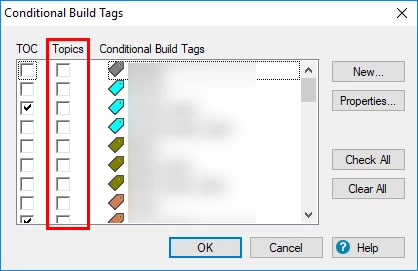
Specifically, I would like to know:

  1. What functionality does selecting/deselecting the "Topics" checkbox allow/disallow?
  2. If the "TOC" checkbox is selected, should the "Topics" checkbox also be selected?
  3. Is there any scenario in which the "Topics" checkbox would be selected, but the "TOC" checkbox would not?

I am using RoboHelp 2017.

This topic has been closed for replies.

1 reply

Captiv8r
Legend
August 14, 2017

Hi there

Hmmm, I've used RoboHelp for more than 20 years. Until today, I had not seen this column of check boxes.

With Conditional Build Tags (CBTs) you may apply them to the TOC elements, to content inside a topic, or to the topic itself. And as you are seeing, any combination thereof. Until RoboHelp 2015 release and its interesting capability to use CBTs to dynamically filter things, I've long avoided tagging items in the TOC. This is because I have personally experienced oddness when tagging TOC elements. And I am aware that tagging a topic so it is excluded from a build will automatically remove it from the TOC. So I have really never bothered much with tagging TOC elements.

But the Dynamic Content Filters changes that playing field. I discovered that in some cases you do need to tag TOC elements in order to make the filters work appropriately in certain circumstances. And no, I can't tell you what the exact circumstances were that caused it. I only remember that I had to do it.

My brief testing of this seems to suggest that when you right-click the TOC item and choose Conditional Build Tags > New/Multiple, the dialog with these columns allows you to apply one or more tags to that specific TOC element, as well as an ability to apply one or more tags to the topic linked to the TOC element.

There could be several reasons why a TOC element would be tagged but not a topic. Or why a topic would be tagged and not a TOC element. And hopefully you are aware that the TOC frequently does not present all topics in a system. For example, there are often topics that exist only to amplify information in other topics. And in those cases, it wouldn't make sense to list them in the TOC.

Hopefully this helps you better understand things.

Cheers... Rick