
Answered
Questions regarding Parent/Child projects in RoboHelp 2017
I am using RoboHelp 2017 with a Parent and three child projects which have just been upgraded from RoboHelp 11, and wondered if anyone can help with the following problems using the Responsive HTML5 layout.
- I need to change the screen sizes at which the output changes between Desktop/Tablet/Mobile. I understand this is simple to do in version 2015, but cannot see how to do this in version 2017.
- When opening the Index.html file in one of the Child projects, the black vertical bar between the TOC and the topic is not displayed, and the width of the TOC cannot be resized. In the Master and other child projects, this bar is displayed, and the TOC can be resized. I would appreciate some advice on how to fix this as it is causing problems linking to the Help from the application. The Responsive HTML5 layout preview looks fine.
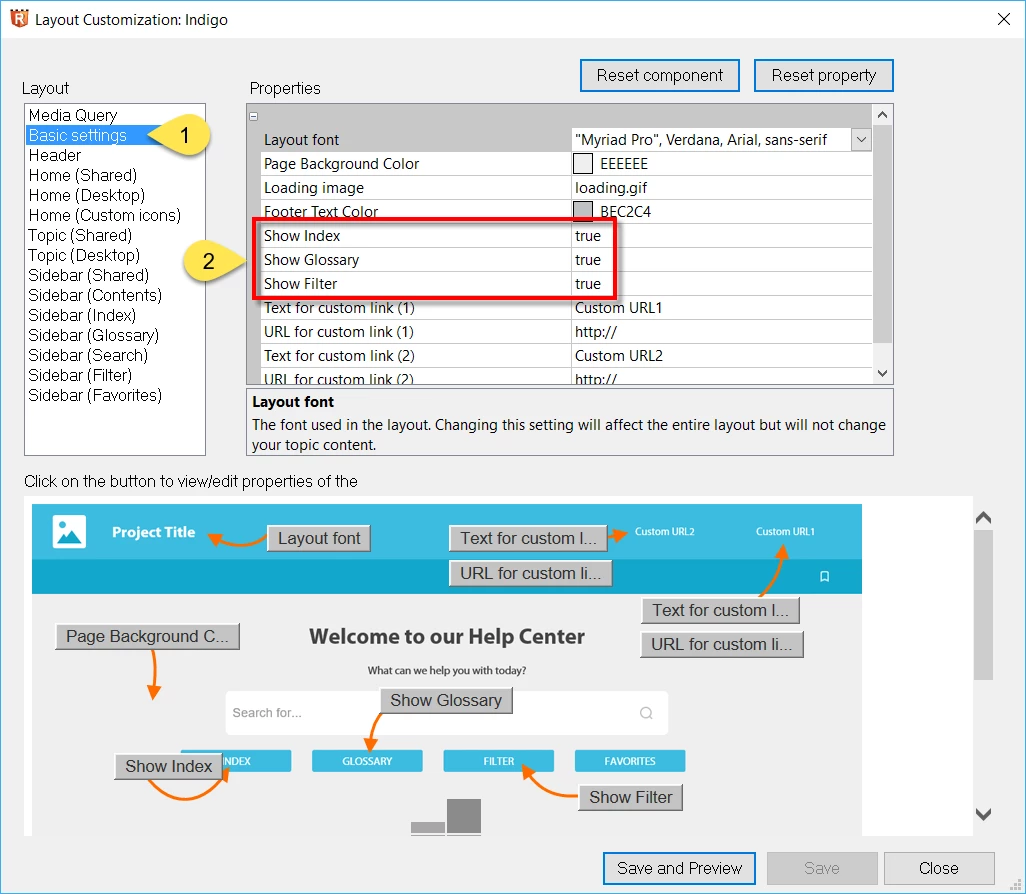
- Please could you explain how to turn off the display for the Index and Glossary. I understand this is simple to do in version 2015, but cannot see how to do this in version 2017.
- The parentdata.js file for the above child project is different to the other child projects as it does not contain a reference to the child project. This setting appears to control whether a topic is highlighted in the TOC when you select it in the search results. I assume this file should have the same content for all of the child projects. This is an important feature, so would appreciate any help in fixing this.


 AdChoices