


RoboMan
Participant
July 6, 2022
Question

Quotes for Search Not Working in Update 8 for RH 2020

  • July 6, 2022
  • 8 replies
  • 166 views

Quote-enclosed search works in Responsive HTML 5 output (Azure_Blue skin) for our merged output generated with RoboHelp 2020 update 7. It no longer works in output generated with RoboHelp 2020 update 8. 


Running Windows.


Installed and upgraded all existing projects from update 7 to update 8. Generated output and discovered that quote-enclosed search no longer works - the searching icon (default four square animation) just perfoms its animation and no searches are returned.

Created all brand new output definitions in each project, as well as all new (re-downloaded) Azure_Blue skins. Same result.


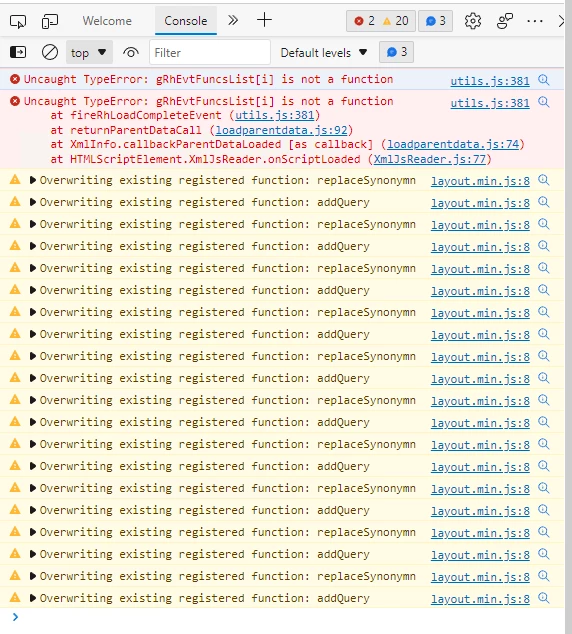
2 errors are reported if I open dev tools in my browser:
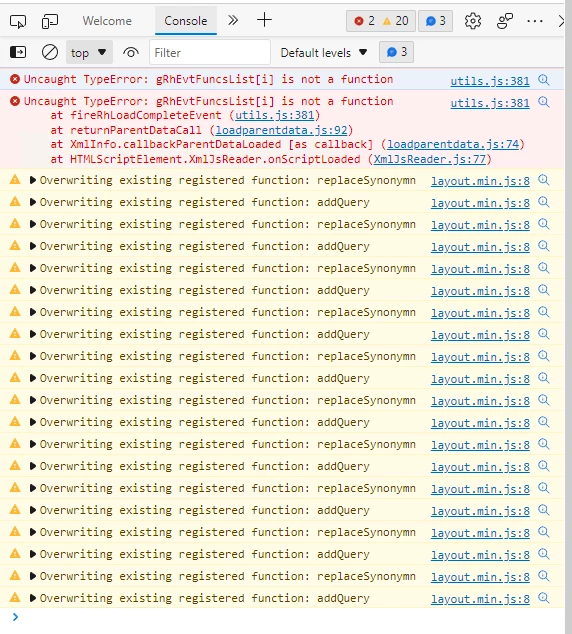
 

Not sure if those layout.min.js warnings are an issue either. 


Thoughts?


This topic has been closed for replies.

8 replies

Community Expert
July 7, 2022

If the sample project is not in your Document>My Robohelp Projects folder, you can copy a fresh version from the Robohelp installation directory in Program Files. DO NOT try to open the project in that location as security features on that folder will cause it to fail.

Peter Grainge
Community Expert
Community Expert
July 6, 2022

I wasn't aware of that so I can't answer right now. Given my search was working, I would not be investigating this issue until the sample project works. You need to establish the issue is only with your merge. As I said, my merge is still working in 2020.8, hence being suspicious there is something else at play here.

________________________________________________________

My site www.grainge.org includes many free Authoring and RoboHelp resources that may be of help.


Use the menu (bottom right) to mark the Best Answer or Highlight particularly useful replies. Found the answer elsewhere? Share it here.
RoboMan
RoboManAuthor
Participant
July 6, 2022

2020.8 is creating a new file in the root of my parent output;


csh-redirect.htm


2020.7 doesn't create this file. What is it? 

Peter Grainge
Community Expert
Community Expert
July 6, 2022

I just tested a simple merge and searches with and without quotes worked correctly.

________________________________________________________

My site www.grainge.org includes many free Authoring and RoboHelp resources that may be of help.


Use the menu (bottom right) to mark the Best Answer or Highlight particularly useful replies. Found the answer elsewhere? Share it here.
Peter Grainge
Community Expert
Community Expert
July 6, 2022

I just checked About RoboHelp and it opened fine. Are you opening the copy in Documents > My RoboHelp Projects.


You need to get past that first to establish your installation is OK.

________________________________________________________

My site www.grainge.org includes many free Authoring and RoboHelp resources that may be of help.


Use the menu (bottom right) to mark the Best Answer or Highlight particularly useful replies. Found the answer elsewhere? Share it here.
RoboMan
RoboManAuthor
Participant
July 6, 2022

I get this when I attempt to open the sample About RoboHelp project:


RoboMan
RoboManAuthor
Participant
July 6, 2022

Update - it's not just quote-enclosed search - even search without quotes has the same behavior.

Jeff_Coatsworth
Community Expert
Community Expert
July 6, 2022

I'd say if it's happening in the sample About Robohelp project too, then you need to contact the RH folks - you can use the tcssup@adobe.com e-mail address or file a Tracker (https://tracker.adobe.com/) bug with the details.