
Known Participant
September 15, 2016
Question

Remove border around the topic page in Responsive HTML5

  • September 15, 2016
  • 2 replies
  • 468 views

Hi,

I need your assistance. In my responsive HTML5 output, I notice a border around the content topic.
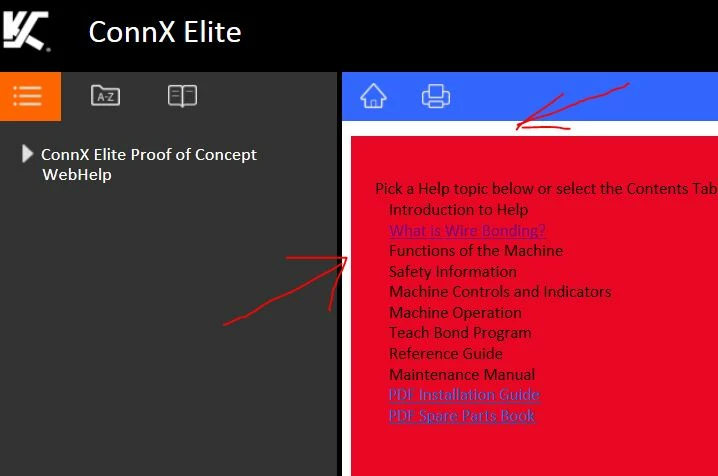
Is there a way to remove the border or margin around the topic so that it looks consistent across the topic page?

Your help is much appreciated.

Thanks.

Regards,

Kai

This topic has been closed for replies.

2 replies

KaiLeongAuthor
Known Participant
September 16, 2016

Thanks Guys.

I'm using Tech Comm Suite 5 - single sourcing from FM12 to RH11. But My first Index Page is directly from RH11.

There is this inherent white space on the top and left margins just before the top and side inner borders. When you maximize the output HTML5 view on a wider screen, the white space on top and left margins expands. When minimized, the white space is not so obvious. The project CSS has no effect the white space.

This is what I put in the project CSS:

body {

background-color: gray;

margin-left: 0px;

margin-top: 0px;

padding: 0px;

}

If I publish it thru Webhelp, there is no white space.

If I publish it thru' Responsive HTML5, there is white space.

In the default responsive HTML5 skin, there are two other CSSs: 'jqueryui-custom.css' and 'main.css'. Also, comes with a few js files.

Would you know what to change on either one of these two CSSs to remove the whitespace?

I've uploaded the two CSSs here.

I appreciate your help. Thanks!

Regards,

Kai

Willam van Weelden
Inspiring
September 16, 2016

The topic CSS only fixes the topic contents. In HTML5, the content has a margin and the white background shines through.

Add the CSS in the layout.css of the Screen Layout instead of your project/topic CSS.

Jeff_Coatsworth
Community Expert
Community Expert
September 15, 2016

What version of RH? I thought that there was a template editor in RH2015 that allowed you to tinker with some of the elements in the output, but I may be mistaken.

Willam van Weelden
Inspiring
September 15, 2016

I don't believe that option is in the editor. But you can change it by adding the following CSS to the layout.css file. (Open the file in notepad and paste it at the end.)

body.media-desktop div.topic {

  background: red;/* Place your required background color here */

}