
Remove leader and page number from chapter TOC
RoboHelp 2026.03.13
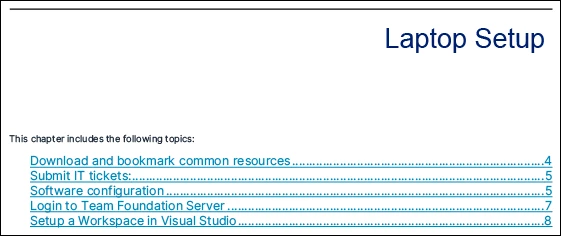
I need to know how to remove the leader and page number from the Chapter TOC present on the Chapter_first page. I want to continue to have the name of the article, but I have not been able to find any place to remove the leader and page number.
I do not want to change the leader and page number from the main document TOC.
This is my chapter toc on the chapter_first page:
   <div data-type="chapter-toc" style="margin-top: 8pt;margin-bottom: 24pt">
      <ol class="chaptoc-body" data-class="level2" data-from-selector="h2" data-selector="h2" data-to-selector="h2" data-type="chaptoc-body" style="">
        <li><a class="chaptoc-level-2" href="#">Heading 2</a></li>
      </ol>
    </div>
This is the current entry in Layout.css:
.chaptoc-body {
  font-family: 'Inter UI';
  list-style-type: none;
  padding-left: 0.25in;
  margin-top: 8pt;
  margin-bottom: 24pt;
  font-weight: normal;
  text-decoration: underline;
  font-size: 11px;
  color: #009BDE;
}
.chaptoc-level-2 {
  font-size: 14pt;
  text-decoration: none;
  font-weight: normal;
    text-decoration: underline;
    color: #515784;
}
.toc-level-2::after {
  content: leader(space) " " !important;
}
At the advice of various AIs (I tried 3 and they all agreed), they all suggested adding one of these blocks to my layout.css which actually prevents it from displaying anything in the Chapter TOC:
.chaptoc-body li::after,
.chaptoc-body a::after,
.chaptoc-level-2::after {
  content: none !important;
  display: none !important;
}
or:
.chaptoc-level-1::after,
.chaptoc-level-2::after,
.chaptoc-level-3::after,
.chaptoc-body li::after {
    content: target-text(attr(href url)) !important;
}
I have removed those blocks as they were counter productive.
This how my output should look:
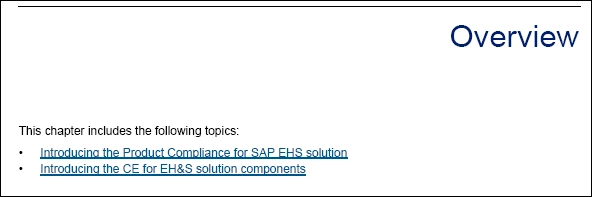
This is how it currently looks:


 AdChoices