

TechWriter1025
Known Participant
July 12, 2016
Question

Remove list of conditional build expressions - RoboHelp 11

  • July 12, 2016
  • 1 reply
  • 751 views

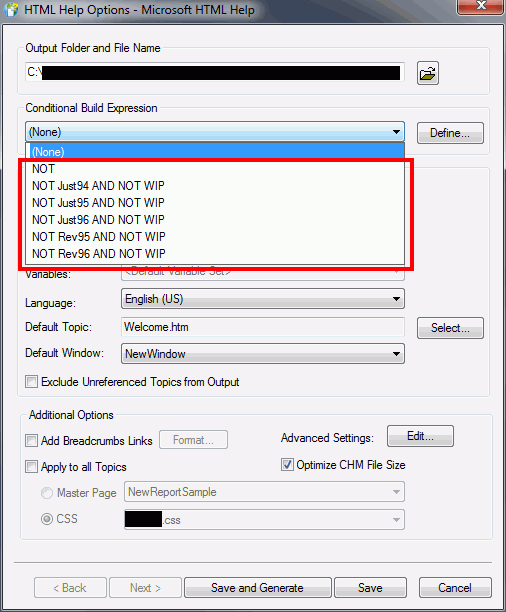
I'd like to remove the list of conditional build expressions that accumulate (Single Source Layouts > Right click item > Properties > Conditional Build Expression drop-down list). We often use tags then remove them so eventually those conditional build expressions are no longer needed. It would be best if these expression could be removed because I see them as a mistake waiting to happen.

After I select an expression, I click Define which opens the Define Conditional Build Tag Expression window. In the Advanced section, I click Clear then OK but the expression still remains in this drop-down. Is there a way to clear this list?
This topic has been closed for replies.

1 reply

Inspiring
July 12, 2016

You were so close when you were on the Define Conditional Build Tag Expression window! You just need to select the expression in the drop-down and click the Delete icon. If I were to click the Delete icon on the screenshot below, it would delete my "Online_Internal" expression.

Captiv8r
Legend
July 12, 2016

Are you seeing this in RoboHelp 11? Don't have it in front of me at the moment, but I was thinking this feature only emerged in 2015 release.

TechWriter1025
Known Participant
July 12, 2016

I'm in 11 and no, I do not see a delete button. Perhaps that is only for 15?

However, a coworker told me about finding the project's .pss file, opening it in Word Pad, then deleting the conditional build expressions from there. This is not an intuitive solution!