
Auntie_Em-Pam
Known Participant
June 17, 2014
Question

Remove underscore from buttons, add Alt text

  • June 17, 2014
  • 1 reply
  • 564 views


Hi,

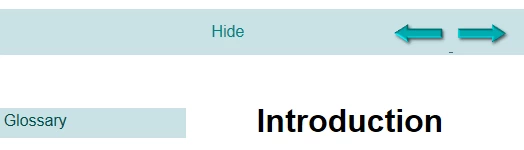
Thanks in advance for your help. I am having more problems with the RH's Govt template. The forward and back buttons would not appear, so I have created my own buttons and incorporated into my user guide. However, there is an underscore appearing in between my buttons (it's not on my images). If I remove this underscore from the Topic (default) page of the template, it removes one of my buttons. My developer can't figure this one out either.

Also, when I add the Alt text into the HTML code, it does not appear when I generate the file. Here's where I am with this now:

  1. RH's Back/next does not work, so I went into the Layout and added my own buttons, which appear here on the Topic (default) page of the template. What are all the underscores?

2.  This is the generated User Guide - any attempt to remove this underscore will delete the button on the right.
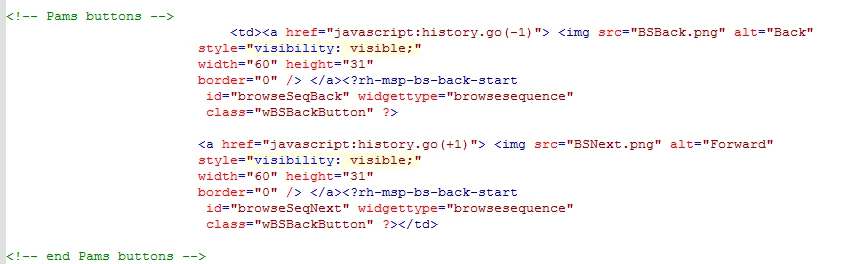
3.  This is my coding. You see that I have the Alt text in the coding, however, it does not appear in the generated user guide. Also, I don't see anything resembling an underscore in the coding.
This topic has been closed for replies.

1 reply

Willam van Weelden
Inspiring
June 17, 2014

Try adding the following attribute to the hyperlink:

style="text-decoration: none;"

Kind regards,

Willam

Auntie_Em-Pam
Known Participant
June 17, 2014

William,

Thanks for your response. My developer and I incorporated the above into the HTML source code and it removed the right arrow button. Any time we make a change to this particular section of code, it deletes the right arrow button. Sheesh. The only workaround was to do all code editing in Notepad and then paste it back into RH again. We have to do this every time. It's annoying. So having done this in Notepad, the underscore is gone, but the Alt tags still don't appear.

This is where we are now with the code:

<td><a href="javascript:history.go(-1)" style="text-decoration:none;"> <img src="BSBack.png" alt="Back"
      style="visibility: visible;"
      width="60" height="31"
      border="0" /> </a><?rh-msp-bs-back-start
       id="browseSeqBack" widgettype="browsesequence"
       class="wBSBackButton" ?>

      <a href="javascript:history.go(+1)"> <img src="BSNext.png" alt="Forward"
      style="visibility: visible;"
      width="60" height="31"
      border="0" /> </a><?rh-msp-bs-back-start
       id="browseSeqNext" widgettype="browsesequence"
       class="wBSBackButton" ?></td>

Also, this has caused a new problem: when I save (generate) this to the server and test it , every time I click on a different topic, 'Show' flashes on and off on the screen and the arrow buttons shift right, then back left. Now, we initially moved the arrows to a different location in the Theme2_Government template. Does that have anything to do with this goofy flashing and movement?

Thanks again,

Pam

Auntie_Em-Pam
Known Participant
June 25, 2014

William,

I know you are really busy, but if you have the time, could you offer any suggestion on how to fix this moving button and flashing Show issue? I would really appreciate it. I need to upload for the client and must fix this issue first.

Thanks,

Pam