


Participating Frequently
February 15, 2021
Answered

Removing indent from mini TOC-Adobe Robohelp 2019 (Classic) version

  • February 15, 2021
  • 3 replies
  • 495 views

Hi All,


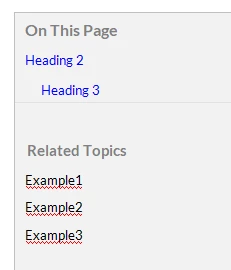
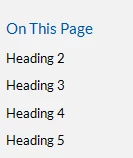
We have added a mini TOC in the Project which donot need an indentation for Mini TOC on the page (Responsive help). For example, if we have heading 2, heading 3, heading 4 and so on on the page, then we want all those headings or atleast heading 2-4 to be included in the minitoc; but the mini toc must not be indented. Can anyone please help with this issue. 

Thank you!


Currently this is happening:
 

Expected Output is this:


    This topic has been closed for replies.
    Correct answer Peter Grainge

    As far as I can see it's the same issue.


    Please follow this link to request features. https://tracker.adobe.com

    Post the link to your feature request in this thread and others can vote for it. The more people who do so, the higher it gets prioritised.

    ________________________________________________________
    See www.grainge.org for free Authoring and RoboHelp Information

    3 replies

    Community Expert
    February 15, 2021

    I needed to adjust the indenting for a particular project. The only way I found was to insert the placeholder inside a div, then inspect the output to determine how to adjust it. It required advanced css and the technique needed will depend on what structure you selected in the Topic TOC Options dialog box.


    Assuming you selected "No list style" you'll need something like the following.


    In the topic place a div around the topic toc placeholder. It must have a class so you can target the elements inside it.

    <div class="TopicToc">
        <?rh-placeholder .... ?>
    </div>

    Then in your css you'll need something along these lines. The exact technique will depend on how you have the topic toc set up. Inspect the generated output to figure out what html you need to target. You'll need to use advanced css techniques and manually add the css into the stylesheet. This example is for "No list style" topic tocs and will not work for the bullet or numbered list options.


    div.TopicToc p[style*=margin-left"] {
        margin-left: 0px!important;
    }

    What this does is find all the p styles inside the TopicToc div which have an inline "margin-left" specified. Then it sets the margin-left to 0. "!important" is needed to allow the stylesheet style to override the inline style, which normally takes precedence. 


    This example is for 'No list style" topic tocs only. And only for Robohelp Classic 2019 and earlier.

    Peter Grainge
    Community Expert
    Peter GraingeCommunity ExpertCorrect answer
    Community Expert
    February 15, 2021

    As far as I can see it's the same issue.


    Please follow this link to request features. https://tracker.adobe.com

    Post the link to your feature request in this thread and others can vote for it. The more people who do so, the higher it gets prioritised.

    ________________________________________________________
    See www.grainge.org for free Authoring and RoboHelp Information

    Use the menu (bottom right) to mark the Best Answer or Highlight particularly useful replies. Found the answer elsewhere? Share it here.
    Peter Grainge
    Community Expert
    Community Expert
    February 15, 2021

    I haven't been able to find what controls the level of indentation in Classic. Your call but I was surprised to see what you want to do as I would have thought showing the hierarchy is useful to users. After all, you are using different heading levels in the topics to differentiate so why not in the mini TOC is my thinking. As I said, your call.

    ________________________________________________________
    See www.grainge.org for free Authoring and RoboHelp Information

    Use the menu (bottom right) to mark the Best Answer or Highlight particularly useful replies. Found the answer elsewhere? Share it here.
    Nutan5EDEAuthor
    Participating Frequently
    February 15, 2021

    Thank you for the quick response!


    Our project do not require indentation in minitoc. 


    Nutan5EDEAuthor
    Participating Frequently
    February 15, 2021

    If you could help me with the query that, can we remove indentation in Robohelp 2020. Is it possible?
