Participant
September 15, 2023
Answered

replace drop-downs with expanding text - RoboHelp 2017

  • September 15, 2023
  • 2 replies
  • 167 views

Hi all,

Apologies if someone has already asked this, but I would like to replace all my RH 2017 drop-downs with expanded text. The issue is that I have a lot of drop-downs in my project, so doing this manually is not an option. Has anyone encounter this issue before? Do you know if there's a way of doing this automatically? 
The idea is to try to replace all the drop-downs with something else that preserves the content inside the drop-downs. Any ideas are more than welcome. 🙂


Thanks in advance!

    This topic has been closed for replies.
    Correct answer Peter Grainge

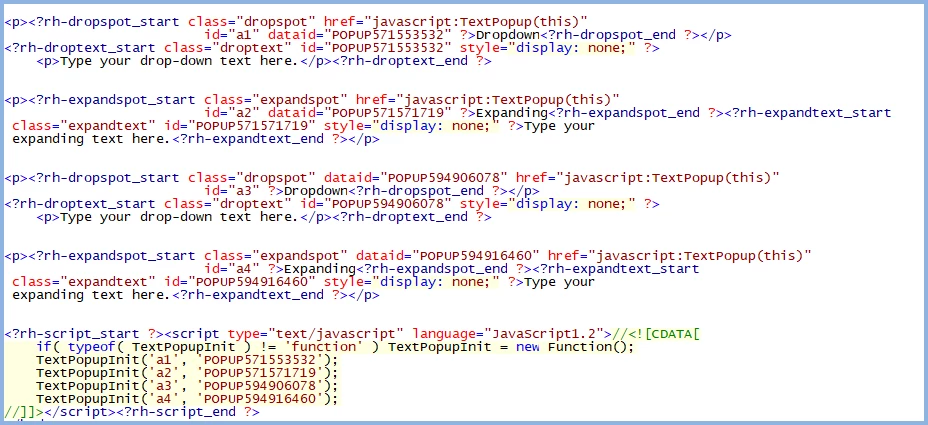
    This is a screenshot of a topic that has both dropdowns and expanding text.


    You can see the find and replacement required. Various terms start dropspot and expandspot so changing dropspot to expandspot fixes the variations and gives you what you want.


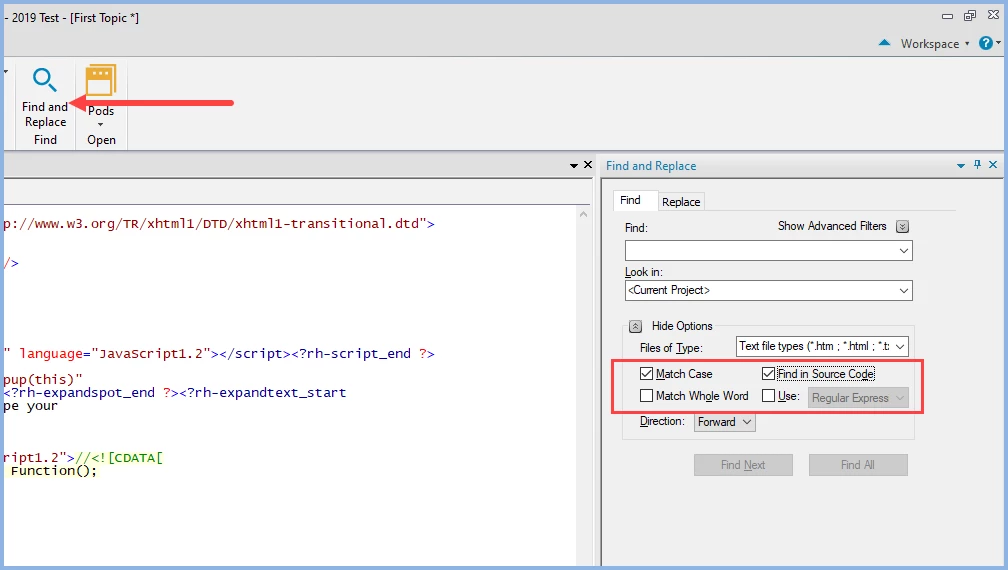
    I tested it in one topic and it worked fine. Before you start create a backup first. I always recommend creating the backup as a zip file. That prevents you opening it accidentally and working on it before you realise it was the backup. This way you always have a clean backup that can be used to create a new clean copy time after time.


    The Find and Replace tool in RoboHelp allows you change this in all topics. Note the options selected.


    Step One is create that backup or there could be tears.

    ________________________________________________________

    My site www.grainge.org includes many free Authoring and RoboHelp resources that may be of help.


    2 replies

    Peter Grainge
    Community Expert
    Community Expert
    September 15, 2023

    Let me know how you get on.

    ________________________________________________________

    My site www.grainge.org includes many free Authoring and RoboHelp resources that may be of help.


    Use menu (bottom right) to mark as Best Answer or to Highlight particularly useful replies. Found the answer elsewhere? Share it here.
    Participant
    September 15, 2023

    It worked, Peter. Many thanks for your help!

    Peter Grainge
    Community Expert
    Peter GraingeCommunity ExpertCorrect answer
    Community Expert
    September 15, 2023

    This is a screenshot of a topic that has both dropdowns and expanding text.


    You can see the find and replacement required. Various terms start dropspot and expandspot so changing dropspot to expandspot fixes the variations and gives you what you want.


    I tested it in one topic and it worked fine. Before you start create a backup first. I always recommend creating the backup as a zip file. That prevents you opening it accidentally and working on it before you realise it was the backup. This way you always have a clean backup that can be used to create a new clean copy time after time.


    The Find and Replace tool in RoboHelp allows you change this in all topics. Note the options selected.


    Step One is create that backup or there could be tears.

    ________________________________________________________

    My site www.grainge.org includes many free Authoring and RoboHelp resources that may be of help.


    Use menu (bottom right) to mark as Best Answer or to Highlight particularly useful replies. Found the answer elsewhere? Share it here.
    Participant
    September 15, 2023

    Many thanks for your quick reply, Peter.