
Known Participant
September 28, 2022
質問

Resizing and centering the TOC tiles on the Home Page tab of the Frameless output in RH 2020.8.34

  • September 28, 2022
  • 返信数 1.
  • 244 ビュー

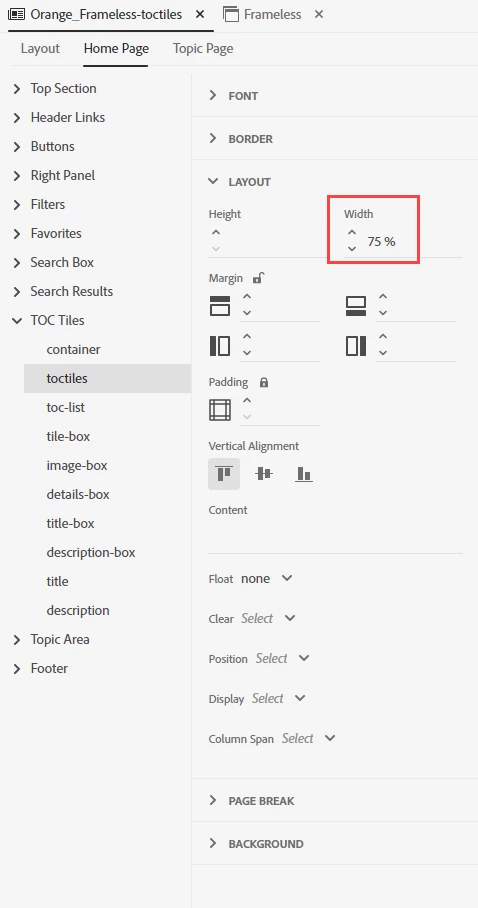
In the Orange skin, can you resize and then center the TOC Tiles > toctiles section on the Home Page tab  of the Frameless output? I resized it to 75% but that left aligns the tiles. I want them to remain centered. Is there a way to do that?
 

    このトピックへの返信は締め切られました。

    返信数 1

    Community Expert
    September 29, 2022

    Try setting margin-left and margin-right to auto. (Click on the padlock so you can set each margin separately.)


    I can't currently test in RH2020, but if you can't type that keyword, you'll need to add a custom css to the User Assets section of the skin. Inspect the output using the developer tools to figure out what the css you need to modify is. (just guessing, but it'll probably be something like div.toc-tiles, then the styles you want in your custom one are margin-left: auto; and margin-right: auto;)

    Tonya Bov作成者
    Known Participant
    October 7, 2022

    Thank you for responding. I was able to modify the margins for the container and move the tiles to the center of the page. It does affect the responsive feature of the RH project, but for our purpose, it works.