
Responsive HTLM5 output does not match template in skin editor
RoboHelp 2022 (version 2022.2.22).
The preview for the Azure Blue skin in the skin editor looks like this (and when I generated it on Tuesday, the output also looked like this):
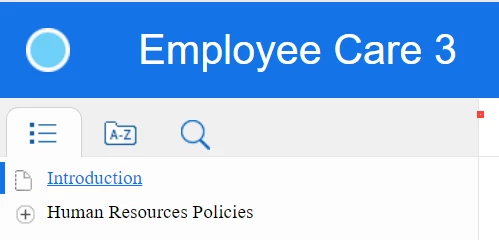
Today, the preview still looks like, but the generated output looks like this:
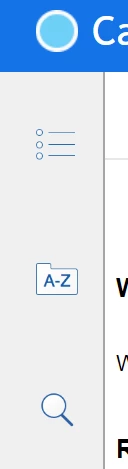
Instead of at the top, the TOC and index buttons are to the side. The TOC also behaves differently. I'm not sure what changed between Tuesday and yesterday/today - the output on Tuesday looked like the first screen print, and when I opened a book in the TOC, it still showed all of the TOC books (similar to how it does in frameless and how the TOC behaved in RH2017). But now when I open a TOC book, it only shows the contents of that book and I have to select a previous folder icon (
 ) to get back to view all of the books. I don't know what happened from one day to the next - yesterday morning I viewed the output before I even opened RoboHelp and it had changed, and no one else works in the project. The output is the same on my PC as it is when I publish it on the intranet site.
How to I get it back to looking like the preview - the first screen print?
(I also tried the Red_Green template just now with the same results - the TOC and index buttons are on the side instead of the top and the TOC doesn't let you view the whole thing once you've selected a book).
thanks!


 AdChoices