
tariuma
Participant
January 21, 2020
Question

Responsive HTML: TOC embedded loop

  • January 21, 2020
  • 2 replies
  • 256 views

Hi,

I am using the built in ‘Black’ theme (but I’ve tested some others too and they all behave the same way) to generate Responsive HTML help documentation for an application.


The default ‘target’ attribute for the TOC div (when viewing on a small screen so that the TOC is collapsed) it set to “_top” (in Index.html). In this state, when the user clicks on the TOC (or the index or glossary) button, it crashes the application.


To avoid this issue, we manually changed the attribute to “_self” and it doesn’t crash anymore.


However, we end of with this situation when we click on the TOC button in collapsed mode:
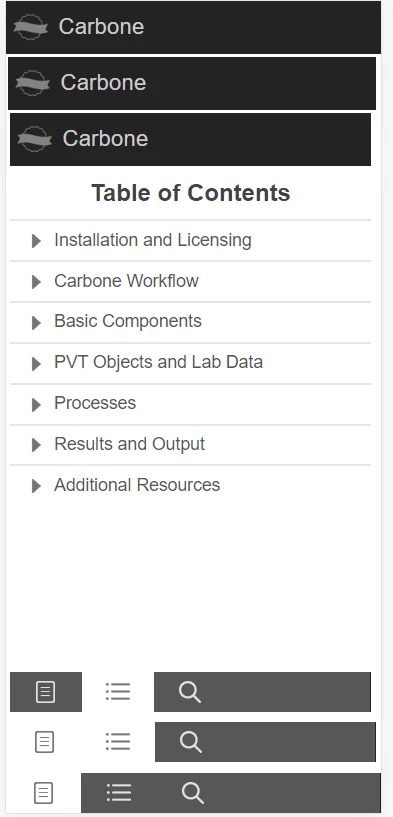


Each time the TOC is accessed, it reloads the entire page (including the title bar and the button bar.  

Is there any way to modify this behaviour without having to change the ‘target’ attribute of these buttons to “_top” or “_blank”?


Thanks

This topic has been closed for replies.

2 replies

Jeff_Coatsworth
Community Expert
Community Expert
January 21, 2020

RH11 is pretty old now for creating HTML5 help - you might want to download a trial copy RH2019 on a non-production machine, update it to the latest version (it won't be fresh out of the box), & test it with a copy of your RH11 project. 

tariuma
tariumaAuthor
Participant
January 23, 2020

Thanks ... it worked. It even resolved the initial issue of crashing the application, so no manual adjustment required to the index page in RH19. 


Thanks again. 

Jeff_Coatsworth
Community Expert
Community Expert
January 21, 2020

What version of RH? Are you all patched up?

tariuma
tariumaAuthor
Participant
January 21, 2020

sorry, RH 11 ... i just ran the update again and it seems it is up to date. 


I wonder though if it is something to do with with css or js code in the skin files, instead of robohelp?


Thanks